


open new tab button

Here we go again. Apparently with this latest version 115.28 I no longer have an open new tab button on my tab line. How do I fix this and tell modifiers to stop changing things that were working fine.
Here we go again. Apparently with this latest version 115.28 I no longer have an open new tab button on my tab line. How do I fix this and tell modifiers to stop changing things that were working fine.
All Replies (3)

Hi,
If it somehow got lost, you can add it again using the Customize toolbar function. If you are not familiar with it, refer to this article: Customize Firefox controls, buttons and toolbars.
Regards, Balázs
Note that the icon can have a different appearance on different bars, in case you do not spot the + right away.
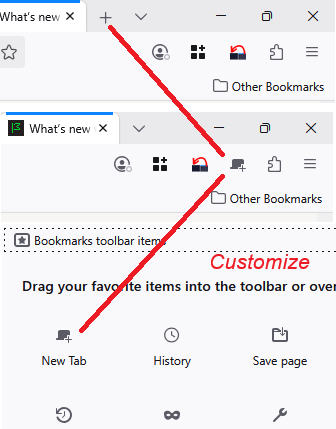
Ok that's it. I didn't know which selection it was. I can't imagine why someone though it should be made optional. Thanks guys