

এই থ্রেডটি সংরক্ষিত ছিল।
যদি আপনি সাহায্য চান তাহলে অনুগ্রহ করে একটি নতুন প্রশ্ন জিজ্ঞাসা করুন

Solved
সংরক্ষণ করা হয়েছে
I cannot see email text

I don't see any more email text, I can send and receive emails but i cannot see the text
I don't see any more email text, I can send and receive emails but i cannot see the text
All Replies (1)
চয়ন করা সমাধান
I'm hoping this just might be a prank that someone played on you (or a mistake made), where Thunderbird has been told to display the text as white on a white background. A faulty appearance theme could be to blame.
Try this:
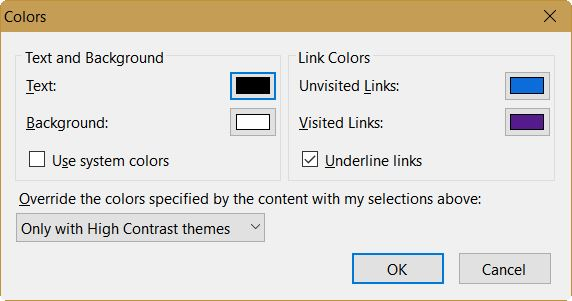
Thunderbird Menu: Tools: Options: Display: Formatting tab. For Fonts & Colors, click on the "Colors" button.
It should look like my snip below. Black text, white background.
If this is not the problem, try changing the appearance theme, if you are not using the default one.
Then try clicking and selecting in the text area of an e-mail message to see if the text is white on white.
user1121639 দ্বারা পরিমিত