


How do I best archive then remove an email account?
I successfully switched a family member to a new email provider. In Account Settings I moved the old IMAP email account lower, changed Account Name to "name@example.com OLD DO NOT USE", and colored its envelope red.
After a few days when I right click the old email account "name@example.com OLD DO NOT USE" and choose Get Messages, nothing happens and menu Tools > Activity Manager shows errors. I went to the old email provider's webmail interface and verified it's not getting any new emails. So in its Account Settings > Server Settings I unchecked "Check for new message at startup and "Check for new messages every X minutes".
After some cleanup its Inbox, Drafts, Spam IMAP folders are empty apart from a large "Sent" folder, but they still show up in Thunderbird's left pane.
So I think it's time to save the old email account's Sent messages in Local Folders and then delete the account.
I can't right-click to move or copy the Sent folder to Local Folders. So I guess I should create a new Local Folder "Old emails sent from example.com", then select all Sent messages, and move them to Local Folders > Old emails sent from example.com.
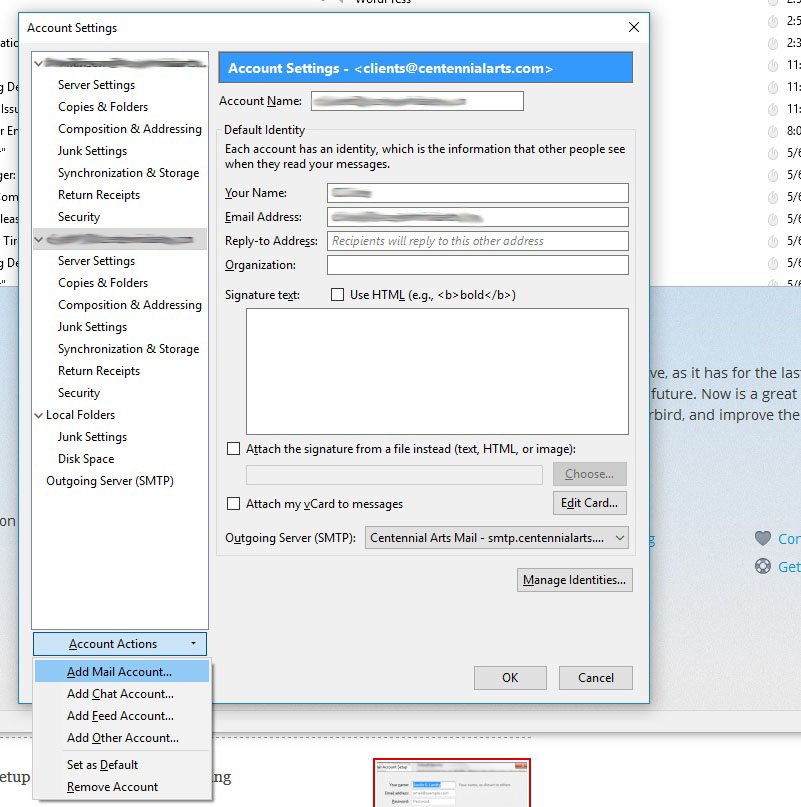
Then, to delete the account, do I just click the red [ Delete] button? BTW, the 9-year-old question here "How do I delete an email account in Thunderbird Mail?" is high in search results, but it is out-of-date and incorrect; it says 'Click the "Account Actions" button on the bottom left and choose, "Remove Account".' and that doesn't exist.
There should be a proper Mozilla Support answer that says how to first archive and them remove an email account. I think what I've written here is close but I welcome any suggestions and improvements.
Всички отговори (3)

You are right to use the local folder to backup your emails. They are saved in your machine and are not bound to the account.
You should have the remove account option: https://support.mozilla.org/en-US/kb/configuration-options-accounts
wxie said
You should have the remove account option: https://support.mozilla.org/en-US/kb/configuration-options-accounts
Thanks for responding. I have something different. I see pictures online of the [Account Actions] button at the bottom of the left-hand panel, e.g. this one, but on my own Thunderbird for Linux, where I only have one account, there's no such button. Instead I have [+ Account] at the top of the left-hand panel, and [Set as Default] and red [🗑Delete] buttons at the top right.

After a few days when I right click the old email account "name@example.com OLD DO NOT USE" and choose Get Messages, nothing happens and menu Tools > Activity Manager shows errors.
What errors?
I guess I should create a new Local Folder "Old emails sent from example.com", then select all Sent messages, and move them to Local Folders > Old emails sent from example.com.
I'd rather copy those messages, as moving would also remove them from the server. Deleting from the server should be the very last thing to do, and only once the messages have been succesfully copied to the Local Folders account.
Having said that, to be able to copy messages from an IMAP account to the Local Folders account, you either still need access to the old IMAP server, or an offline copy of those messages on your local disk. Without that, there is nothing Thunderbird can copy to Local Folders.
it says 'Click the "Account Actions" button on the bottom left and choose, "Remove Account".' and that doesn't exist.
That's for older versions of Thunderbird. Therefore, in your support request, you always want to mention what version of TB you're using.
There should be a proper Mozilla Support answer that says how to first archive and them remove an email account.
See https://support.mozilla.org/kb/archived-messages Wrt deleting an account, the big red 'Delete' button is hard to miss.