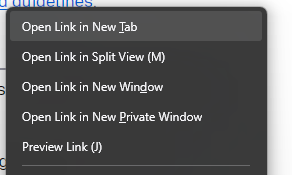
How to remove the Open Link in Split View option in the dropdown menu?

Hi. Now that the 'Open Link in Split View' has annoyingly replaced the spot previously held by 'Open Link in New Window' i keep clicking on it accidentally (muscle memory).
I don't want to have to retrain my muscle memory, but despite creating css file generated by Claude that should in theory remove the option, and putting it the Profile Folder, it will not go away.
How do i remove it?
Hi. Now that the 'Open Link in Split View' has annoyingly replaced the spot previously held by 'Open Link in New Window' i keep clicking on it accidentally (muscle memory).
I don't want to have to retrain my muscle memory, but despite creating css file generated by Claude that should in theory remove the option, and putting it the Profile Folder, it will not go away.
How do i remove it?