


Deleted Items Remain Greyed Out

Using IMAP deleted items remain greyed out. Have tried all suggestions: emptied trash, repaired inbox, checked subscriptions, set expunge. Nothing worked. Am I missing something? All help appreciated. Don't think AOL server is removing the deleted items.
Избрано решение
Finally, after continued research, found that if you compact the trash before cleaning it the proper signal is sent to AOL and the Server entries are cleared and do not return to inbox as greyed out messages.
Всички отговори (5)
It's always helpful if you post info that helps to understand your setup.
- What OS are you using ?
- What version of Thunderbird are you using ?
- Where did you get Thunderbird installation from eg: Windows App Store, Snap, Flatpak or the official download website: https://www.thunderbird.net/en-US/thunderbird/all/
The answer to the above will tell people the default location for a profile.
In Folder Pane: What name do you see for the Trash folder ? eg: Trash or Deleted etc Right click on that 'Trash/Deleted' folder and select 'Properties' in 'Location' look at the end what does it say
- eg: imap://name%40btinternet.com@mail.btinternet.com/Trash
Does TRash folder itself look normal ? Is it only the emails in the Trash that appear a greyed out colour Suggest - upload an image to help understand situation.
Logon to webmail account via a browser. https://login.aol.com/
What is the server name for the 'Trash'?
Does it contain any emails ?
Do you see only the one 'Trash' folder or do you see others like 'Deleted Items' etc ?
Post an image of webmail showing all the folders.
Here is the latest update as of May 29, 2026. Have continually tried all suggestions such as deleting Trash.msf, compacting Trash ,etc (There was no Trash folder in Profile.) Am using latest Thunderbird 151.0.1 and triple checked all settings for AOL. It appears the Thunderbird deletions are not being removed from the AOL Server. AOL support could not help because they consider Thunderbird a third party app. You can log into AOL and delete the items manually. Incoming and outgoing email works fine with Thunderbird. PROBLEM SEEMS TO BE THUNDERBIRD NOT PASSING DELETIONS TO AOL SERVER. Can anyone solve this.?
"Deleted Items" you say.
Once upon a time I creatred an AOL mail account for the sole function of attempting to help folk wedded to AOL for Email. SO I just opened that account in Thunderbird and asked to subscribe to the folders the account offered. below is the dialog.
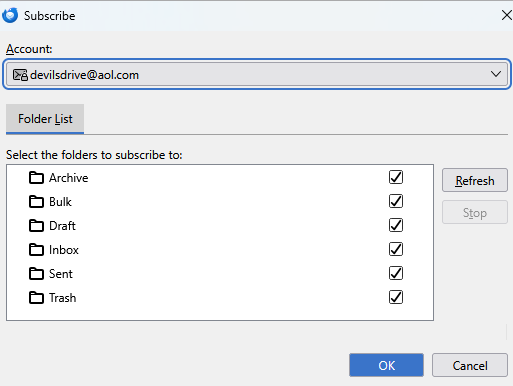
What I do not have is a deleted items folder.
When I look in the account settings, the default deleted mail folder is used.
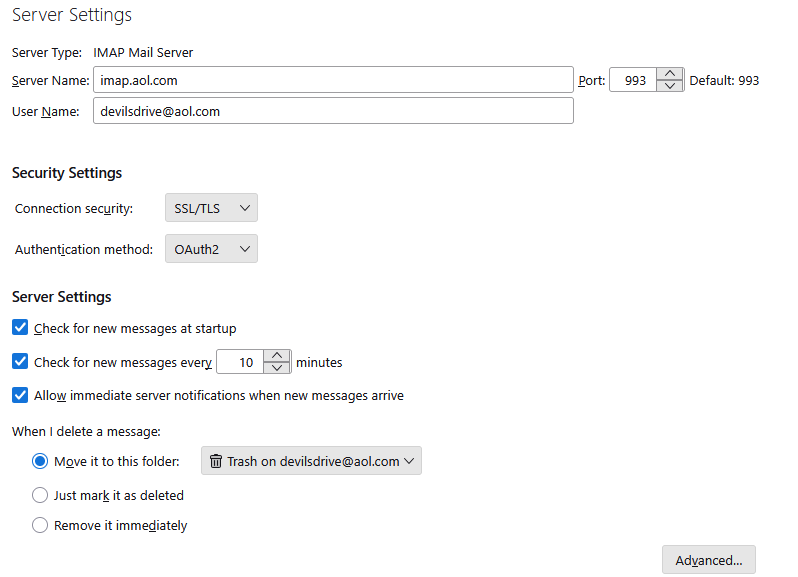
So I am back to this read only deleted items folder you mentioned. Where does is come from? and why would Thunderbird be doing anything with it?
It is not part of the standard AOL interface in a browser.

The only thing I can think of that might explain a deleted items is if you used Microsoft
Outlook as a mail client once upon a time as they used to use that folder name in their product. SO we are clearly having trouble with your non standard usage.
Please fill in some blanks about why there would be a deleted items folder and why you expect Thunderbird to be using it for anything.
Thanks for trying to help but there is some confusion in your reply. There is no folder involved call Deleted. When I delete an email from the inbox it goes to TRASH. When I empty TRASH the IMAP process is, as I understand it, is supposed to remove or delete the message from the server which in this case is AOL. This does not happen. For some reason the deleted messages return to the inbox greyed out. The only way I have been able to remove them is to sign into the server and manually delete them there. Don't know why Thunderbird is not getting the server to delete?
Избрано решение
Finally, after continued research, found that if you compact the trash before cleaning it the proper signal is sent to AOL and the Server entries are cleared and do not return to inbox as greyed out messages.