


Windows 10 reached EOS (end of support) on October 14, 2025. If you are on Windows 10, see this article.

Търсене в помощните статии

Избягвайте измамите при поддръжката. Никога няма да ви помолим да се обадите или изпратите SMS на телефонен номер или да споделите лична информация. Моля, докладвайте подозрителна активност на "Докладване за злоупотреба".

Научете повече

2025 how to default to system print dialogue box instead of Firefox Print

  • 2 отговора
  • 1 има този проблем
  • 306 изгледи
  • Последен отговор от lovejoy444
  • Архивирани

(April 2025) So suddenly, after my most recent FF update, if I have a document open in FF and hit "print" and choose "use system dialog box" (or whatever the exact wording is), Firefox Print opens up instead of my usual system dialog box. Why is this happening, and is there a setting I can change to DEFAULT to the regular SYSTEM PRINT dialog box instead.

I do not like FF Print. It prints one page at a time w/ like a minute pause between pages in a multi page document. And when I need more settings, it opens up the HP dialog box anyway, so wtf is the point? I just want my system dialog box back where all my print settings are in one place.

Thank you for any help!

(April 2025) So suddenly, after my most recent FF update, if I have a document open in FF and hit "print" and choose "use system dialog box" (or whatever the exact wording is), Firefox Print opens up instead of my usual system dialog box. Why is this happening, and is there a setting I can change to DEFAULT to the regular SYSTEM PRINT dialog box instead. I do not like FF Print. It prints one page at a time w/ like a minute pause between pages in a multi page document. And when I need more settings, it opens up the HP dialog box anyway, so wtf is the point? I just want my system dialog box back where all my print settings are in one place. Thank you for any help!

Всички отговори (2)

See screenshot
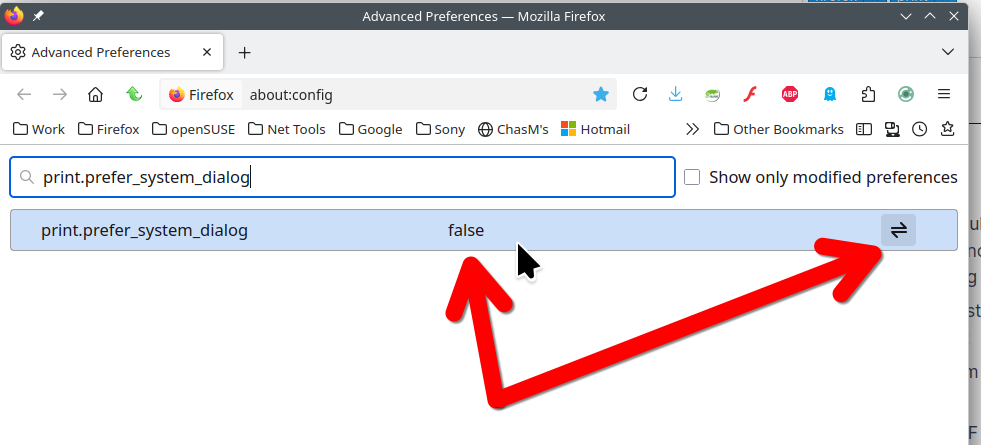
I tried this before posting the question, having found it in another answer. It didn't help. In fact, it took me straight to the FF Print dialog. Thank you, though.