


POWERPOINT NO LONGER SHOWING IN SETTINGS - APPLICATIONS

Hi. Suddenly mid workflow I can only open a PP document by saving it. Usually I would go to SETTINGS - APPLICATIONS and switch out the preference to 'always ask' - however PP now doesn't appear in the menu. How can I add it so I can change the download setting? And why has it suddenly disappeared? I am using / downloading them all the time? Thanks in advance. Regards, Brigitte
Всички отговори (5)

This article may help. https://support.mozilla.org/en-US/kb/change-firefox-behavior-when-open-file
Thanks terry21. I still can't see how to add PowerPoint to the Applications box in Settings (which, as mentioned, was previously there!)
It's in the section linked below. https://support.mozilla.org/en-US/kb/change-firefox-behavior-when-open-file#w_adding-download-actions

See How file downloads are handled in Firefox.
When you download a PowerPoint file you should be able to set "Always Open Similar Files" from the right-click context menu:
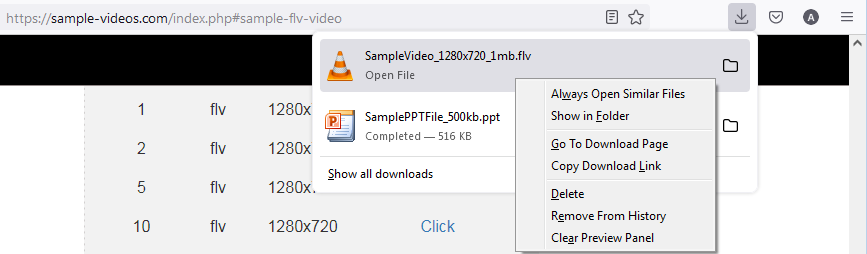
This will create an Applications entry for that type of file in your Firefox settings.
Good luck.