


Failed to get location by JavaScript
I have done the following operations:
- Allowed "Location Permission" of FireFox in system settings;
- Turned on the Location Service in system settings;
And "FireFox Settings > Site permissions > Location" is "Ask to allow(Recommended)"
Please help me with this problem.
ps: I used this page.
Избрано решение
Whoops, had desktop Firefox on my mind.
Here is what I see with your same settings:
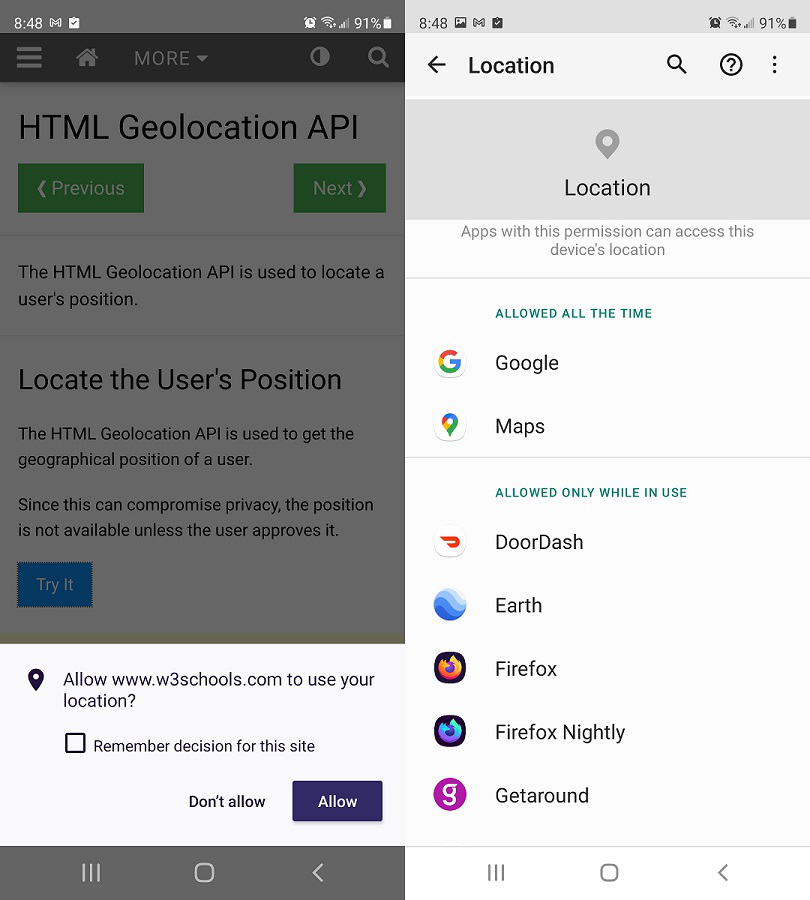
- (left) Firefox for Android when I tap "Try It" on https://www.w3schools.com/html/html5_geolocation.asp -- the experience is similar on https://www.w3schools.com/html/tryit.asp?filename=tryhtml5_geolocation_map_script or the URL you mentioned
- (right) Android's Settings > Apps > Permission Manager > Location list showing Firefox has location permission

Do you use any add-ons that could affect location permission requests?
Всички отговори (12)
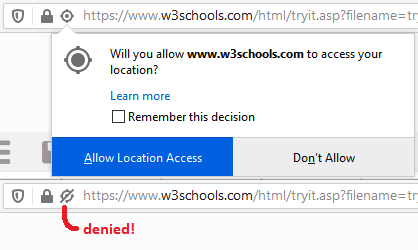
Does W3Schools say that permission was denied: "User denied the request for Geolocation"? (See screenshot for the address bar icons.)
Or is the problem that Firefox can't provide precise location? Generally speaking, on systems that do not have a GPS feature, location is determined using wi-fi hotspot data and Google Location Services. More info: Does Firefox share my location with websites? If wi-fi is disabled (or not available), or if Google access is restricted, then this feature might not work.
jscher2000 said
Does W3Schools say that permission was denied: "User denied the request for Geolocation"? (See screenshot for the address bar icons.) Or is the problem that Firefox can't provide precise location? Generally speaking, on systems that do not have a GPS feature, location is determined using wi-fi hotspot data and Google Location Services. More info: Does Firefox share my location with websites? If wi-fi is disabled (or not available), or if Google access is restricted, then this feature might not work.
I was accessing that website via Firefox Android. Firefox Android did NOT display a select box about location permission like this.
/////
Променено на от huangyang20020223
/////
Променено на от huangyang20020223
/////
Променено на от huangyang20020223
/////
Променено на от huangyang20020223
/////
Променено на от huangyang20020223
Did you checked settings directly in the Firefox? Just click the menu button ≡ then click Settings > Site permissions > Location.
Променено на от Kryštof
Избрано решение
Whoops, had desktop Firefox on my mind.
Here is what I see with your same settings:
- (left) Firefox for Android when I tap "Try It" on https://www.w3schools.com/html/html5_geolocation.asp -- the experience is similar on https://www.w3schools.com/html/tryit.asp?filename=tryhtml5_geolocation_map_script or the URL you mentioned
- (right) Android's Settings > Apps > Permission Manager > Location list showing Firefox has location permission
Do you use any add-ons that could affect location permission requests?
Kryštof said
Did you checked settings directly in the Firefox? Just click the menu button ≡ then click Settings > Site permissions > Location.
Yes, I did it before.
This problem may caused by HTTPS. Some browsers disabled geolocation when access sites WITHOUT HTTPS. I got the source code and put it in my LAN server, and accessed it with LAN IP, so NO HTTPS :-(, it didn't work.
jscher2000 said
↑Geolocation worked because W3Schools enabled HTTPS.
(sorry for bad english - wish you can understand it.)
I didn't think of that. It look like all mobile browsers require HTTPS:
https://developer.mozilla.org/docs/Web/API/Geolocation_API#browser_compatibility