


How to bookmark the current page?

The older "Bookmark this page" item at the top of the Bookmarks menu is not there. I can scroll down (a long page of entries) but cannot scroll high enough to see a "Bookmark this page" item to click. Never had this problem prior to Firefox Quantum.
Избрано решение
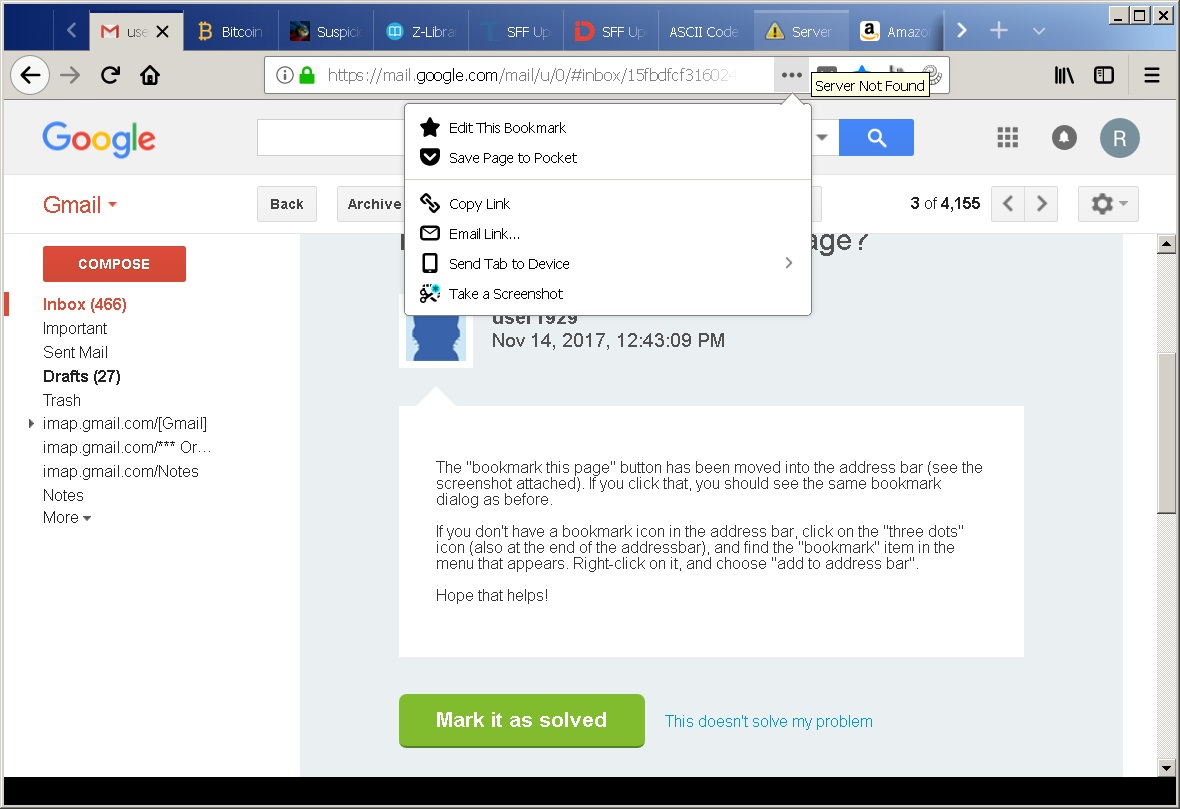
If you see "Edit this bookmark" then this means that the current tab is bookmarked (star is highlighted blue in the screenshot you posted). This is the same behavior you had in previous Firefox versions, only this item is now in the page actions drop-down menu. You can click the star as well.
Прочетете този отговор в контекста 👍 0Всички отговори (3)
The "bookmark this page" button has been moved into the address bar (see the screenshot attached). If you click that, you should see the same bookmark dialog as before.
If you don't have a bookmark icon in the address bar, click on the "three dots" icon (also at the end of the addressbar), and find the "bookmark" item in the menu that appears. Right-click on it, and choose "add to address bar".
Hope that helps!
I could not find any "screenshot attached". And, in the 3-dots item, there is no "bookmark item" in it's dropdown menu (unless you meant "Edit this bookmark"). I've added a screenshot of that menu.
Избрано решение
If you see "Edit this bookmark" then this means that the current tab is bookmarked (star is highlighted blue in the screenshot you posted). This is the same behavior you had in previous Firefox versions, only this item is now in the page actions drop-down menu. You can click the star as well.