


Firefox Personal Bar display is set on but it shows an empty bar, although it has 15 elements

I use Firefox 29.0.1. In my Personal Bar there are 15 elements, but if I set on the Personal Bar display it appears empty, void, below the address bar.
Избрано решение
Make sure that toolbars like the "Bookmarks Toolbar" are visible.
- Firefox menu button > Customize > Show/Hide Toolbars
- View > Toolbars (press F10 to show the Menu bar)
- Right-click empty toolbar area
Use Toolbar Layout (Customize) to open the Customize window and set which toolbar items to display.
- check that "Bookmarks Toolbar items" is on the Bookmarks Toolbar
- if "Bookmarks Toolbar items" is not on the Bookmarks Toolbar then drag it back from the Customize palette into the Customize window to the Bookmarks Toolbar
- if missing items are in the Customize palette then drag them back from the Customize window on the toolbar
- if you do not see an item on a toolbar and in the Customize palette then click the "Restore Defaults" button to restore the default toolbar setup
Всички отговори (5)
Firefox is working well on my desktop (with windows 7 64 bit home OS), only the Personal Bar, when displayed, is empty. I have installed and run Places Maintenance and all is allright but the problem is not solved. The bookmarks in my Personal Toolbar are still there like all the bookmarks in all folders, and I can access them but in 3 clicks instead of 1. Images added to show you the empty bar.

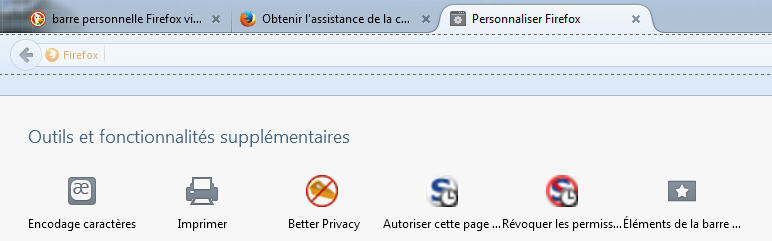

Just a guess, but maybe the localstore.rdf file is corrupt. http://kb.mozillazine.org/Corrupt_localstore.rdf
Избрано решение
Make sure that toolbars like the "Bookmarks Toolbar" are visible.
- Firefox menu button > Customize > Show/Hide Toolbars
- View > Toolbars (press F10 to show the Menu bar)
- Right-click empty toolbar area
Use Toolbar Layout (Customize) to open the Customize window and set which toolbar items to display.
- check that "Bookmarks Toolbar items" is on the Bookmarks Toolbar
- if "Bookmarks Toolbar items" is not on the Bookmarks Toolbar then drag it back from the Customize palette into the Customize window to the Bookmarks Toolbar
- if missing items are in the Customize palette then drag them back from the Customize window on the toolbar
- if you do not see an item on a toolbar and in the Customize palette then click the "Restore Defaults" button to restore the default toolbar setup
Thank you very much Cor-el, it worked, when I upgraded to Firefox 29 and customized I probably didn't understand the importance of "Bookmarks Toolbar items" and didn't put it in the right place. I dragged and dropped it in the empty bar. How did I miss this simple action in the first place? Problem solved.