layout problem
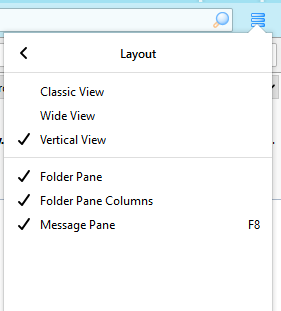
I have download Thunderbird on to my new PC and it will not allow me to change from classic view to Vertical, Classic has a tick against it and the other layouts are greyed out. I have to go into setting in task as in email i have no access to the 3 lines that bring up options.
I have download Thunderbird on to my new PC and it will not allow me to change from classic view to Vertical,
Classic has a tick against it and the other layouts are greyed out.
I have to go into setting in task as in email i have no access to the 3 lines that bring up options.
All Replies (1)
If you click the 3-line icon in the upper right corner, Options/Layout, you should see the 3 options as in the attached picture. Or, press Alt to show the Menu Bar, then View/Layout. If any of the layouts can't be selected, see if the problem remains in safe mode (hold Shift when TB is launched).