


Remove extensions button from toolbar

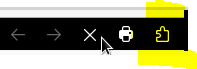
I need to be able to hide the Extensions button from the toolbar. Is there a way to do that outside of the user.js or prefs.js? Preferably I'd like to do this though the policies.json file though I could not find any options for this.
I need to be able to hide the Extensions button from the toolbar. Is there a way to do that outside of the user.js or prefs.js? Preferably I'd like to do this though the policies.json file though I could not find any options for this.
Isisombululo esikhethiwe
We do not provide a way to remove this button.
You would have to use something like userChrome.css
Funda le mpendulo ngokuhambisana nalesi sihloko 👍 1All Replies (4)

Isisombululo Esikhethiwe
We do not provide a way to remove this button.
You would have to use something like userChrome.css
Do you know what the text for that would be? I tried the below text and it did not work so I am assuming it is now referred to differently now:
- unified-extensions-button, #unified-extensions-button > .toolbarbutton-icon{
width: 0px !important; padding: 0px !important; }
Is userChrome.css enabled? You have to set a pref to use it now.