


Firefox crashes

Attempting to print emails in google mail to pdf, while in Firefox, now always results in Firefox hanging with "not responding" while Acrobat distiller keeps running. Neither process responds to task manager's "end task". Many times I had to resort to restarting the pc. It has happened since the new google design a week or so ago. Starting Firefox in safe mode makes no difference. Adobe can print pdfs from any other webpage - except that when printing the adobe test page it produces garbled fonts in the pdf. All other web pages print normally to pdf. Windows 7 64 Adobe Acrobat X Pro 10.1.8 (worked fine since 2011 until now) Firefox 25 (updated tonight - previoulsy on 24 - makes no difference to the problem)
所有回复 (8)
We're sorry to hear that Firefox is crashing. In order to assist you better, please follow the steps below to provide us crash ID's to help us learn more about your crash.
- Enter about:crashes in the address bar (that's where you enter your website URL) and press Enter. You should now see a list of submitted crash reports.
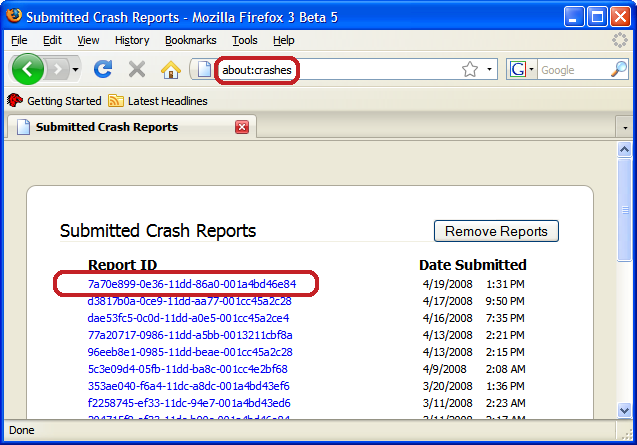
- Copy the 5 most recent crash ID's that you see in the crash report window and paste them into your response here.
Thank you for your help!
More information and further troubleshooting steps can be found in the Troubleshoot Firefox crashes (closing or quitting unexpectedly) article.
Try Firefox Safe Mode to see if the problem goes away. Safe Mode is a troubleshooting mode, which disables most add-ons.
(If you're not using it, switch to the Default theme.)
- On Windows you can open Firefox 4.0+ in Safe Mode by holding the Shift key when you open the Firefox desktop or Start menu shortcut.
- On Mac you can open Firefox 4.0+ in Safe Mode by holding the option key while starting Firefox.
- On Linux you can open Firefox 4.0+ in Safe Mode by quitting Firefox and then going to your Terminal and running: firefox -safe-mode (you may need to specify the Firefox installation path e.g. /usr/lib/firefox)
- Or open the Help menu and click on the Restart with Add-ons Disabled... menu item while Firefox is running.
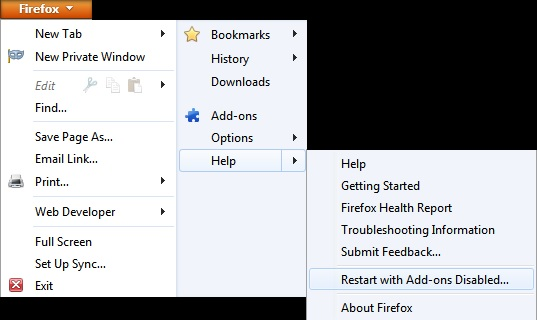
Once you get the pop-up, just select "'Start in Safe Mode"
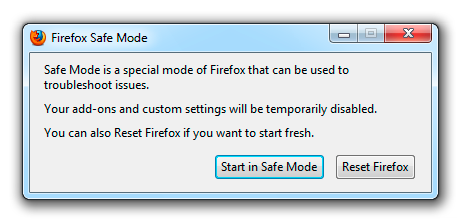
If the issue is not present in Firefox Safe Mode, your problem is probably caused by an extension, and you need to figure out which one. Please follow the Troubleshoot extensions, themes and hardware acceleration issues to solve common Firefox problems article for that.
To exit the Firefox Safe Mode, just close Firefox and wait a few seconds before opening Firefox for normal use again.
Please report back soon.
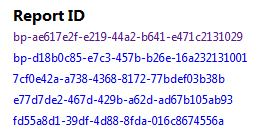
Report attached. Safe Mode makes no difference.
Sometimes a problem with Firefox may be a result of malware installed on your computer, that you may not be aware of.
You can try these free programs to scan for malware, which work with your existing antivirus software:
- Microsoft Safety Scanner
- MalwareBytes' Anti-Malware
- TDSSKiller - AntiRootkit Utility
- Hitman Pro
- ESET Online Scanner
Microsoft Security Essentials is a good permanent antivirus for Windows 7/Vista/XP if you don't already have one.
Further information can be found in the Troubleshoot Firefox issues caused by malware article.
Did this fix your problems? Please report back soon.
apologies - larger image this time
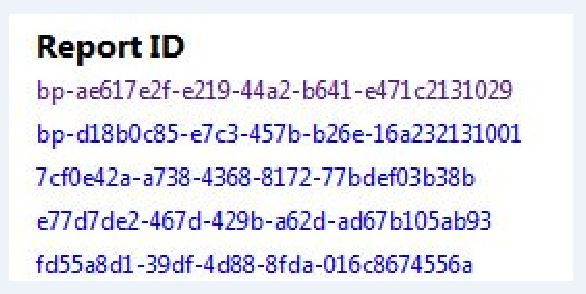
Please post click-able links for those crash report ID's.
Scanned with Malwarebytes - no problems.
How do I log out of this support? Thanks
That looks like a problem with QuickTime.