How to copy link text from links?

Currently when selecting a link, there is no easy option to copy link text. This feature should be implemented to be one of the options in the popup menu once a link is selected, alongside with "Open Link in New Tab"; "Copy Link"; !"Copy Link Text"!; "Share Link"; "Bookmark Link". This menu option will provide a convenient way to browse through search results and other various links and will add to the efficiency of navigation of web pages.
所有回复 (3)
You would have to select that link text and use Copy if you want to copy the link text and not the link (Copy Link Location).
When I am copying a link into gmail, event hough it is a working link, it copies as plain text not clickable. In IE8 If I copy to gmail the link comes up blue...how can I make mozzila do this.
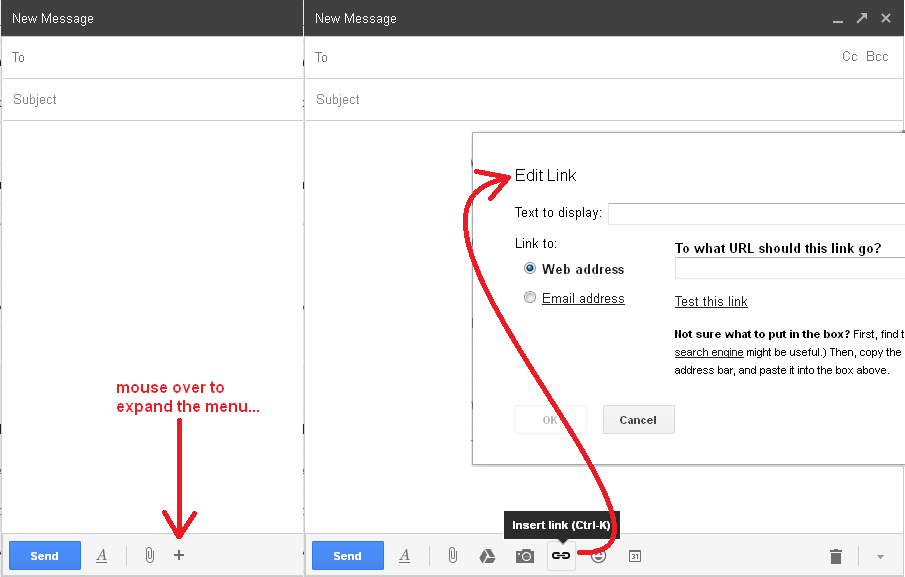
Hi eva88, are you copying from a webpage or from the address bar? If you copy a link from a webpage, Gmail should pick up the HTML as is from the original. But when you copy from the address bar, you need to take the extra step of using the "link" button in Gmail. Due to changes in the Gmail UI, this may be harder to find, but for me, it appears when mousing over the lower part of the compose box. I've attached a series of screen shots showing where I see it.