


Firefox 6 does not seem to work well with certain Pogo Games?

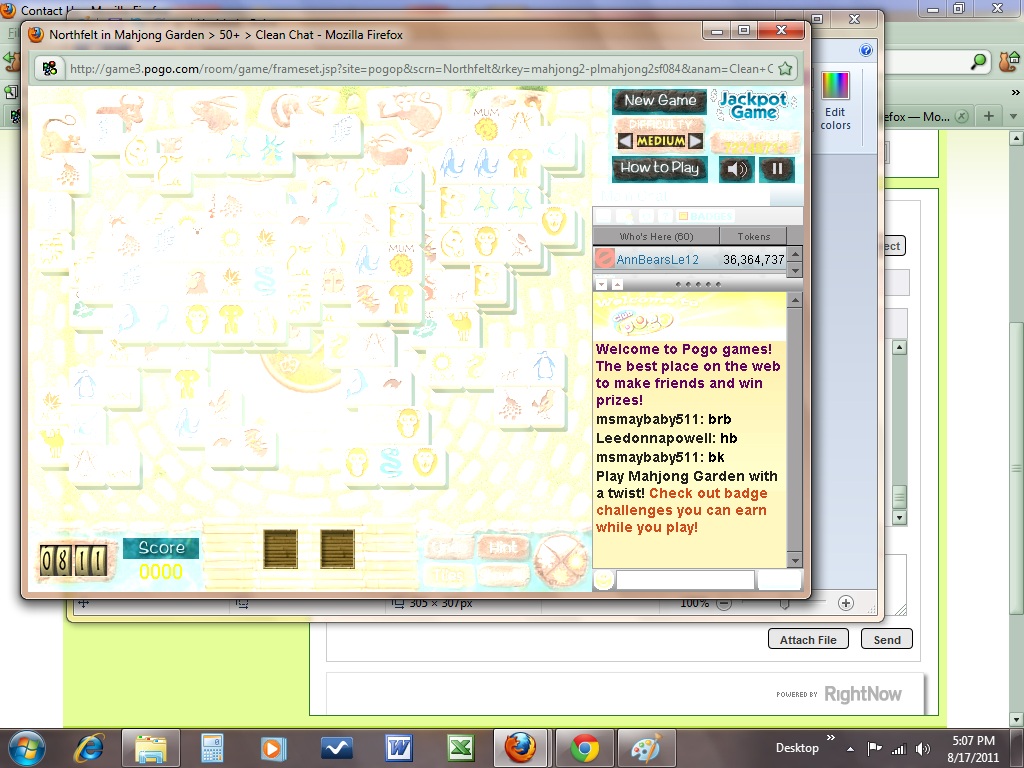
Yesterday (08/17/11) Firefox automatically updated to 6.0 and now there are certain Pogo games that don't load right - it's like the graphics are all faded and impossible to see to play the games. I went back to Firefox 5.0 and now there are no problems. I checked to make sure my Java, Flash Player and Graphic driver are all current and they are. I also made sure my temp files and cache were cleared. So some how Firefox 6 has an issue that conflicts with Pogo
被采纳的解决方案
See this list of Firefox 6.0 Compatible Themes:
Check and tell if its working.
To help other users find solutions, please return to this Thread and Sign-in to the forum with your Username and Password:
click on "Solved It" Next to the reply ABOVE that BEST solved your Question
DO NOT click "Solved It" next to this reply
定位到答案原位置 👍 0所有回复 (5)
IF you again update to Firefox 6.0, do these:
Troubleshooting extensions and themes
Clear Cookies & Cache
Clear the Network Cache
Troubleshooting plugins
Check and tell if its working.
由Hasan于修改
I have already done all those things (except starting in Safe Mode) BEFORE I updated to Firefox 6.0 I have a progam - ParetoLogic Privacy Controls that automatically cleans out all my temp files and cache every week as well as web searches, history, etc. And everthing is up to date - Java, Flash Player, Plugins, Graphics Driver, etc. I even tried uninstalling and re-installing Firefox but that didn't help either. I also did start Firefox in Safe Mode and that isn't the problem either - the same issue occurred. I have uploaded the screen print I took to show the problem. It isn't for all pogo games, just some of them
-> Create a New Profile as a test to check if your current profile is causing the problems.
-> Basic Troubleshooting: Make a New Profile
-> If that New Profile works then you can recover your Bookmarks and Passwords from the Old Profile.
-> Recovering important data from an old profile
Check and tell if its working.
Ok - I solved the problem. It was due to an appearance theme add-on - Red Cats (green flavor) So now I don't have my cats anymore and there don't seem to be any appearance theme add-ons for Firefox 6.0. Hopefully this will be eventually fixed too - I WANT MY CATS BACK!!!!!!!!!!!!!!!!!!!!
选择的解决方案
See this list of Firefox 6.0 Compatible Themes:
Check and tell if its working.
To help other users find solutions, please return to this Thread and Sign-in to the forum with your Username and Password:
click on "Solved It" Next to the reply ABOVE that BEST solved your Question
DO NOT click "Solved It" next to this reply
由Hasan于修改