


Windows 10 已于2025年10月14日停止支持。如果您正在使用 Windows 10,参见 这篇文章

Windows 10 reached EOS (end of support) on October 14, 2025. If you are on Windows 10, see this article.

搜索 | 用户支持

防范以用户支持为名的诈骗。我们绝对不会要求您拨打电话或发送短信,及提供任何个人信息。请使用“举报滥用”选项报告涉及违规的行为。

详细了解
Open

Can't access websites or links

jbr 已回复
Sheila LV

I have written about this before, but the problems have multiplied. I've been keeping track of all the sites that I can't access in Firefox, and over the last month or so alone, there have been 23 instances of this. Not only not being able to access actual websites, but other connectivity issues. Several examples:

First, my local newspaper e-Edition comes up in a huge format that is unreadable and cannot be made smaller. It works fine on the Brave browser.

Different example: My daughter sent me several different links over a few days on Facebook Messenger to Amazon products that I wanted to buy. Her message is there, but the link/photo isn't. This renders completely normally on Brave.

Some other examples are restaurant menus listed on the restaurant's website, a Word Search puzzle from the L.A. Times, financial websites in which I have accounts. The list is seemingly endless. My last attempt to get support for this problem did not lead to any fix. This all occurs whether or not my adBlockers are turned off.

As a Firefox user since its inception, I don't like having to go to another browser, but the situation has been getting more and more untenable.
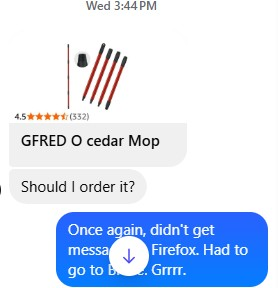
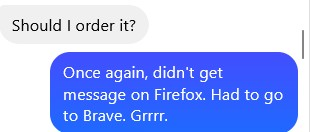
I have written about this before, but the problems have multiplied. I've been keeping track of all the sites that I can't access in Firefox, and over the last month or so alone, there have been 23 instances of this. Not only not being able to access actual websites, but other connectivity issues. Several examples: First, my local newspaper e-Edition comes up in a huge format that is unreadable and cannot be made smaller. It works fine on the Brave browser. Different example: My daughter sent me several different links over a few days on Facebook Messenger to Amazon products that I wanted to buy. Her message is there, but the link/photo isn't. This renders completely normally on Brave. Some other examples are restaurant menus listed on the restaurant's website, a Word Search puzzle from the L.A. Times, financial websites in which I have accounts. The list is seemingly endless. My last attempt to get support for this problem did not lead to any fix. This all occurs whether or not my adBlockers are turned off. As a Firefox user since its inception, I don't like having to go to another browser, but the situation has been getting more and more untenable.
已附加屏幕截图

所有回复 (1)

How did the troubleshooting end up last time? https://support.mozilla.org/en-US/questions/1573253#answer-1808933 — any comparable results in that mode?

我要提问

您需要登录才能回复。如果您还没账号,可以提出新问题