


No home page settings

I am switching from firefox to firefox-esr. Version 147.0.3 to 140.7.0esr, start firefox with --allow-downgrade which mostly works. What does not is the "Home default" page, it is blank and can not even be configured to what it was because the settings page is also blank, nothing below "choose what content ...".
I have done this on 4 machines now with same failure for the home page. settings. My previous workaround was new profile and import data so the setting page is therein ESR. This is a far harder than it should be there being no single export-import. I had to export import history with a third party plugin and cookies the only method [I found] was to copy the sqlite file. Others like password export-import are fragmented.
所有回复 (5)

james180, the release notes for Firefox 147.0.4 include "Fixed an issue that could cause the New Tab Page to appear blank for some users."
So you could try first updating to this version, and then attempt to open the newly updated profile in Firefox ESR? (But before performing either step, first create a backup copy of your profile folder on the hard drive, naturally.)
Just to be clear, it is the settings page which is blank. If the setting page had controls I could attempt to set the required values.
Starting from a new profile ESR has the settings and allows configuration of the required components on the Home page.
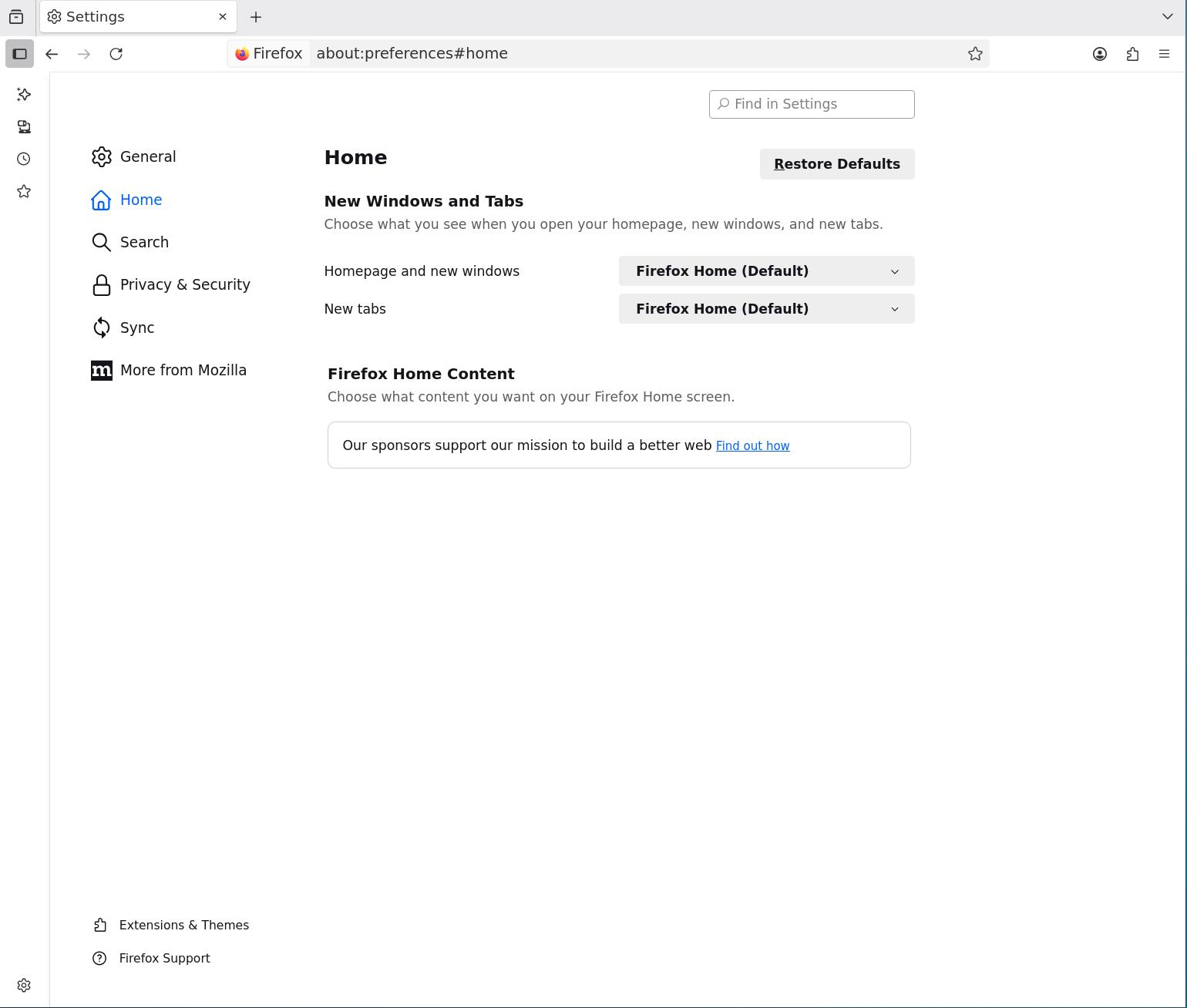
james180, the bug causing the blankh homepage / settings section may have been introduced in a later version of regular Firefox?
That would mean that ESR does not have it, yet a newer Firefox does, and so if you attempt to run a profile with this underlying bug then it might manifest within ESR?
The hope was that if you update regular Firefox to the latest version with the bugfix for the blank homepage issue, this might also update the profile files with whatever is needed to remove the problem from them. Then when you run the updated / fixed profile from regular Firefox in ESR, you won't see the problem in ESR?
(assuming that the blank homepage / homepage settings bug is caused or partially caused by something within the profile settings or files and not purely by the Firefox installation files, of course.)
由TechHorse于修改
Good morning,
I have installed 147.0.3 and moved the profile. Start firefox-esr -P -allow-downgrade. It appears to import all except the home page configuration. Worst is I can not make home page choices because the settings' page is blank as per the image I uploaded.
As ESR works and it is not hard to configure a home page, is there a file that stores these data that I can simply delete or possibly edit and start from defaults?
james180, 147.0.4 is the version with the blank homepage bugfix. A 147.0.3 profile might still trigger it.
If you nevertheless want to try to fix the 147.0.3 profile in ESR, then unfortunately I cannot help with an isolated reset of just the homepage settings. Maybe someone who knows the specifics of that will see this.
You can however try deleting the Firefox preference files and see if this returns the homepage settings. See the section "Solution 2: Delete Firefox preference files" in this article: https://support.mozilla.org/en-US/kb/reset-preferences-fix-problems#w_solution-2-delete-firefox-preference-files
You might also want to consider the first solution. But once again, ensure that you have a backup copy of your profile folder on the hard drive before attempting either one. And unfortunately in either case you may need to redo a lot of other settings to get things back to where they were.
由TechHorse于修改