


CAN'T RESURRECT EMAILS AFTER ALL ATTEMPTS

As a last resort to restore my emails after trying everything else, if I delete my account and register it again as a new account will I lose all current emails and folders?
所有回复 (4)
Short answer is probably.
My limited understanding is optus have just completed handing all of their mail business to the same firm that took over iinet and westnet mail. Have you gone through at migration?
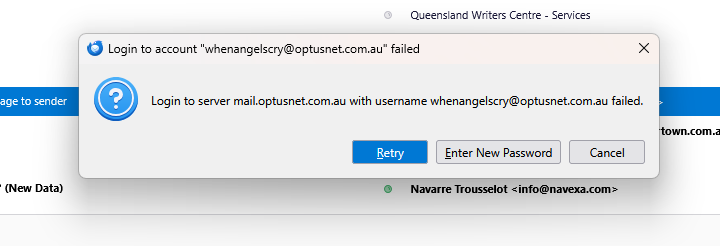
Sorry, I don't understand "gone through at migration". I've had Thunderbird for a long time and this 'failed to log in to server' is a recurring problem, the solution for which seems to be different every time. This time it's got me stumped. If this and other issues seem to be common and constantly occurring, why doesn't Mozilla fix them?
I have two accounts on Thunderbird. One is via outlook.office365.com and works fine. The other is via mail.optusnet.com.au and has stopped responding. The only differences are the port number and the fact that the Optus one has no option for OAuth2. I can only set it to Normal Password. Please help!!
whenangelscry said
Sorry, I don't understand "gone through at migration".
Perhaps you and Optus need to have a conversation about the changes in the past couple of years. They affect you.
https://www.optus.com.au/support/answer/we_re_making_improvements_to_our_optusnet_service_20318#:~:text=No%2C%20your%20email%20address%20will,easy%20to%20use%20and%20navigate.
What’s the reason for the change? Optus is committed to improving the OptusNet email experience for our customers. OptusNet has been an excellent email platform for Optus customers for approximately 30 years. Since that time email technology has evolved in terms of useability and security. In order to bring those improvements to our customers, Optus has decided to update our email service to a new hosted solution. This will provide the benefit of a modern email platform that reduces spam and offers enhanced security and privacy to our customers.
I've had Thunderbird for a long time and this 'failed to log in to server' is a recurring problem, the solution for which seems to be different every time.
Yes you were told a long time ago on this forum that it was probably time to move on from Optus, but I see a long litany of failures in your question history, most of which could well be attributed to antivirus software products but not a particular preponderance of timeouts of other connection issues. Certainly something I would expect for someone that uses McAfee or Norton or even BitDefender. Intermitent antivirus failure is far more common that email program of email server iussues, just most folk do not know that their issue have the source they do.
So lets have a look at some specifically. I guess the last 2 years will do.
https://support.mozilla.org/en-US/questions/1540752 that sounds like you have a VPN. Google do not like them and tend to block all sorts of products because they think you are being hacked. Especially if you have a phone reporting to them that you are somewhere else. Score one for your antivirus is my guess. although the ip address is an OPUS Queensland one n110-32-62-0.rdl21.qld.optusnet.com.au [110.32.62.0] so it is not the usual away on holidays issues that come with the once a years laptop use. and it's inherantly being out of date and invariable slow.
https://support.mozilla.org/en-US/questions/1546921 Lots of talk about the home page. If you had clicked on an email, any email that display would have been replaced with the email content.
https://support.mozilla.org/en-US/questions/1558481 You were asked a question and that was where it ended. However perhaps take the time to read about message filters. https://support.mozilla.org/en-US/kb/organize-your-messages-using-filters They autoforward without an issue.
https://support.mozilla.org/en-US/questions/1563456 I guess you supplied no information so you failed to attract the attention of anyone. Perhaps try the steps in the support acticle. https://support.mozilla.org/en-US/kb/cannot-receive-messages Or just get rid of your antivirus program. I would guess that is strike two.
https://support.mozilla.org/en-US/questions/1448308 I did my best, but I still think that is strike three for antivirus. But as you never offered any further issues, that matter was closed.
. I understand they also promote perhaps the most troublesome software anyone using a mail client can have McAfee. Do you have this mail mangling connection blocking product perhaps or some other third party antivirus installed?
This time it's got me stumped. If this and other issues seem to be common and constantly occurring, why doesn't Mozilla fix them?
</blockquote>