


TB 140.6.0 will not get messages, will not save messages, & will not send messages

This may be a poor / wrong description, but the problem(s) is related to ? server settings ?
Using a Win 10 laptop TB 140.5.0, can receive, & save as a draft, but cannot send e-mail(s).
Using a Win 11 laptop TB 140.6.0 cannot get / receive e-mails random exceptions, unrelated to using Get Mail.
     "         "     "     "        "       "            "      save messages prompt mentions server.
     "         "     "     "        "       "            "      send messages     "              "             "
I tried to look at / check server settings, but have no understanding of what to look at / check / do. I try to screen shot/save what I see, but it times out (disappears) before I can accomplish (remember how) to activate save.
I've also been unsuccessful in transferring - saving book marks - profiles to the Win 11 laptop.
Season's GREETINGS to one & ALL!
Robin
所有回复 (5)
Hi, Robin,
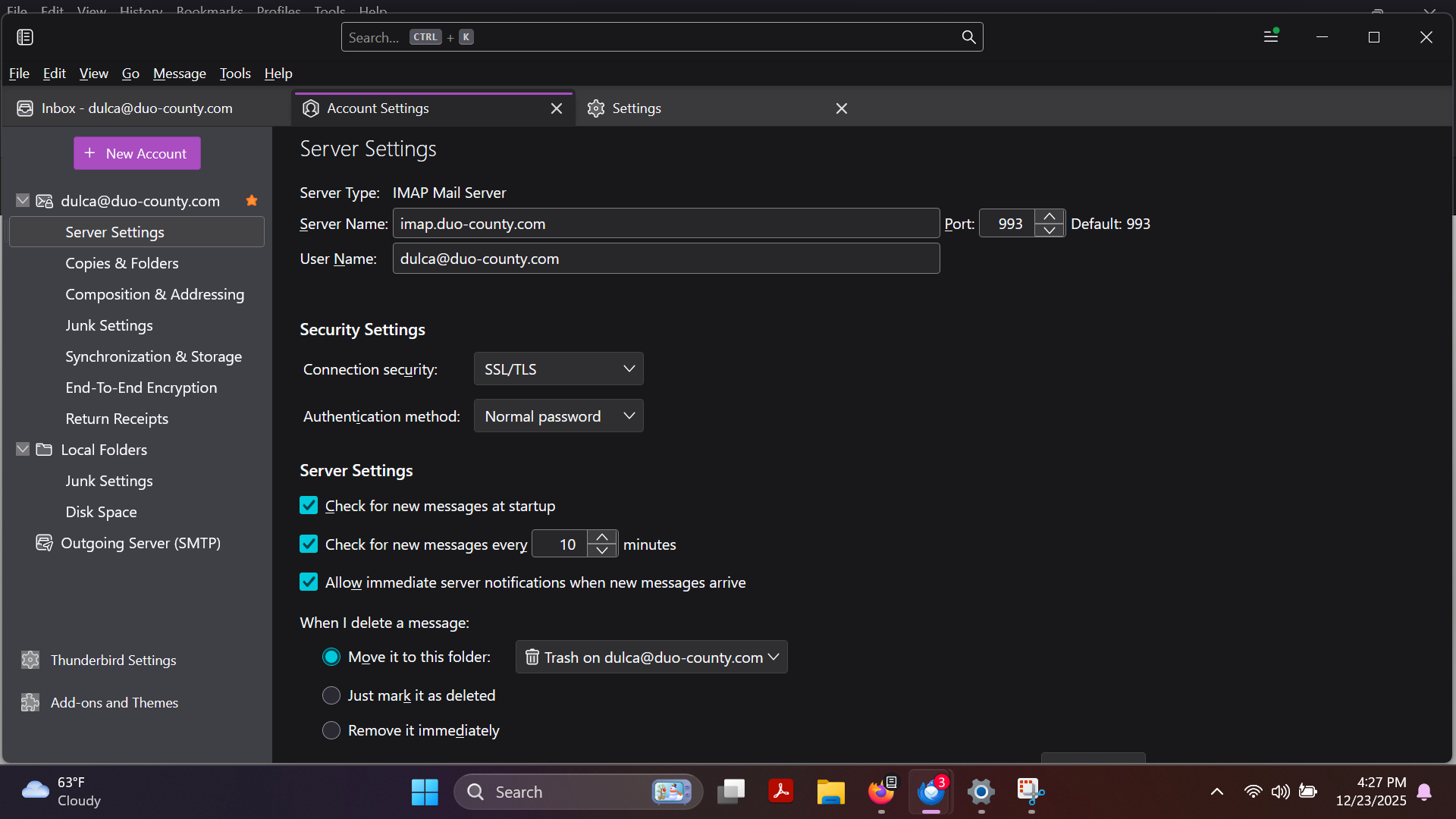
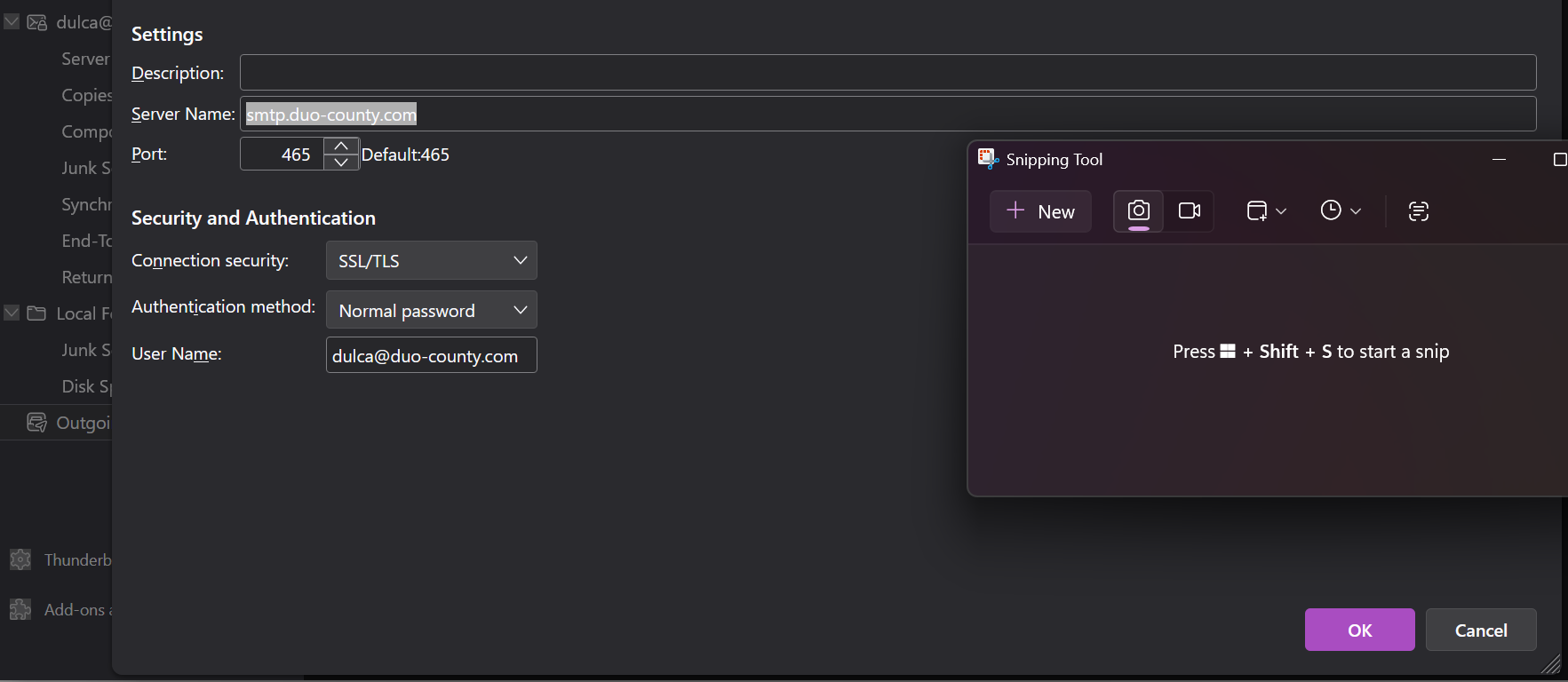
Here is a link to a simple screenshot tool that has many features. and it's FREE: https://picpick.app/en/download/ Use that (or whatever) to create screenshots of your incoming server settings pane and your SMTP server settings pane, and I will attempt to provide assistance. Thanks.
Thanks for your reply!
SORRY it took so long
If I was successful, I've included the receive and send server screen captures.
Season's GREETINGS and well wishes.
Robin
Robin,
This is a carry-over from your prior post - https://support.mozilla.org/en-US/questions/1545544 As Matt mentioned there, you need to get more information from your email provider and how their switch to Zimbra affects your email. Another, possibly simpler option, is to abandon that email provider and set up a new one. My personal suggestion is to consider outlook.com because that is free, well-supported, and Outlook provides a user-friendly online client functionality that eliminates the need for a client on the PC. Over the years, I have had several friends and colleagues make that switch and they have been fully content. Seriously, you have been chasing this problem a long time, and your email provider has not been there for you, yet changed things that seem unsolvable.
David,
Regarding Thunderbird you previously wrote: "... create screenshots of your incoming server settings & your SMTP server settings, & I will attempt to provide assistance."
I provided the server screen shots you requested, but you did not respond with "assistance" nor did you respond with the detail(s) - info I need to request from our ISP. Technically, I cannot fault them for not assisting when I do not know what to ask and you have not enumerated what info/detail I need.
Instead you suggested I leave Thunderbird and go to Outlook. Is there no Thunderbird user who can - will assist me? Even though I am on (using) the Thunderbird help forum! ?
On a positive note, messages do not come in when I click 'get mail, yet a notification does pop up on the lower R of the laptop screen apparently when one reaches the server? According to the In Box info, your post arrived at 5:51 AM and 16 other messages arrived by 9:39 AM. So, either TB is partially 'working' or the server is 'erratic'.
If our ISP 'should' help, what do I ask/request?
Season's Greetings - Remain WELL & be **SAFE!**
Robin
Robin, I do want to help you. The information you provided mirrors what you had posted previously. What is needed is whatever the email provider requires. That could be server name, port number, authentication,whatever. What you are using is the default that worked in the past, but with the change to Zimbra, we don't know. The best question to ask them is "What are the server settings to receive and send email?" And my suggestion to leave that provider I had done previously. You have been working on this for over a month. Nobody here is familiar with that email provider, but we are familiar with many others. I do not recommend an email client, whether Thunderbird or others, if the individual is uncomfortable with dealing in servers, ports, and authentication issue, plus various network errors that periodically occur. My suggestion for Outlook was serious and eliminates the many technical issues that face any email user. If you want to stay with Thunderbird, then I suggest setting up an account with gmx.com. It's free, it works, and people here are familiar with it.
On you question on whether anyone here can assist, the issue is not a Thunderbird issue, it is an email provider issue. You are the customer of that email provider, not thunderbird, not us. They should be able to give you explicit setup instructions for email. They have not. Asking us to figure out what the email provider refuses to share is unfair to us. You are wanting to have someone solve your problem, but it needs your participation. Waiting for your current email setup to be figured out is not my recommendation to resolving this. I do care that you are well served, but that may be best done outside of a PC-based email client.