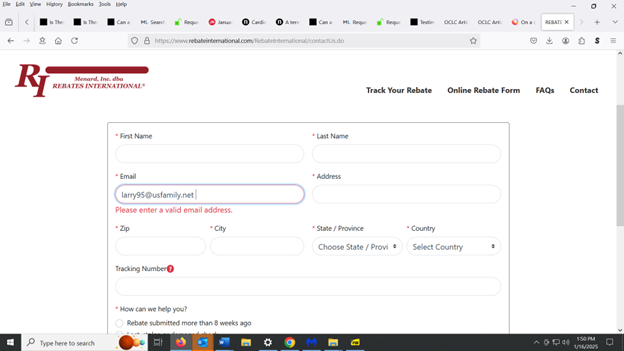
On a certain website, when I try to fill out their webform, Firefox tells me to enter a valid e-mail address even though the e-mail address I have entered is valid

When I go to the website https://www.rebateinternational.com/RebateInternational/contactUs.do and I try to fill out the webform on that page and use autofill to fill in the e-mail address, it gives me an error message that says "please enter a valid email address" even though the e-mail address is valid. Also, if I do not use autofill, but simply type everything in manually, it still gives me that same error message. This problem does not occur in Google Chrome, but it does occur in Firefox. Sometimes I can solve the problem by erasing part of the email address and then re-typing that part, but that doesn't always work. It also doesn't work if I erase the entire e-mail address and type it in manually. The problem does not appear to be caused by add-ons and does not appear to be caused by hardware acceleration, because I have disabled add-ons and have turned off hardware acceleration. It also does not appear to be caused by cache and cookies, because the same problem occurs after I clear the cache and cookies. I will appreciate any response you can provide to help solve this problem.
所有回复 (2)

Without a screenshot error no one is going to know what is happening for the input.
Thank you for your response, markwarner22. I have attached the screenshot you requested. It shows the error message for the e-mail address, even though that is a correct e-mail address, and as I mentioned, this error message does not appear when I use that exact same e-mail address in Google Chrome. So it appears to be an issue in Firefox but not in Chrome. For purposes of the screenshot, I haven't filled out the other fields (such as name and address) because I want to remain anonymous on this Firefox website, but the error message appears for the e-mail address even when I have filled out those other fields in the webform. Hopefully this gives you the information to answer my question. If you need any other information, please let me know.