


new tabs

Why does hitting my Home button open another tab? It's irritating and unnecessary. How do I make it stop?
For that matter, Why can't I open a new tab with my home page already open? I want Duckduckgo. You are bullying me into a blank page or a Firefox page. I used to have a choice.
选择的解决方案
What is your home page setting on the Settings page? If you use "Custom URLs..." you can replicate the problem behavior with text like this:
That vertical bar character demarcates an additional tab to open when you use the Home button. Normally the bar appears only between URLs you want opened in individual tabs and not dangling at the end.
所有回复 (7)

What's set here? see screenshot
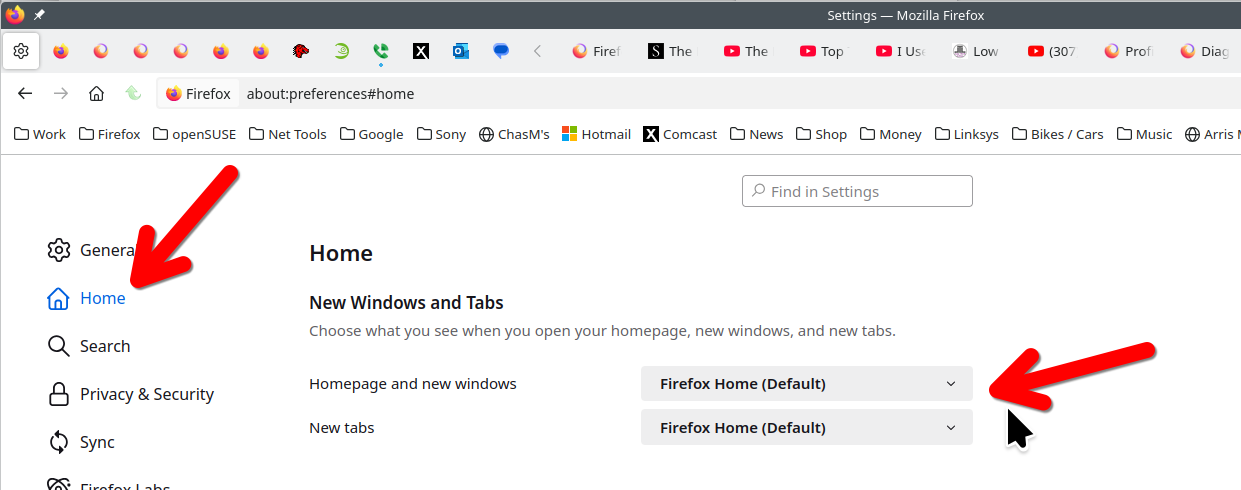
That's what I want to avoid. I want Duckduckgo as my home page on all tabs. Even the new onesThis current version of Firefox won't give me that allowance. My BIG question though was the first one.
Why does hitting my Home button open another new tab? It's irritating and unnecessary. How do I make it stop?
Should we continue in your new thread: https://support.mozilla.org/questions/1477047
Sorry. This is an inelegant solution to my issue. I want to stop FF from opening new tabs every time I hit a HOME button on another Tab. I'm not clear on why FF would want to force me to work in the way it wants rather than the way I want.
This is new from Mozilla and I'm confused by the decision. I've added the New Tab over ride Add on and that works. But this new issue (of the new tab stream) is a deal breaker for me unless somebody can tell me how to fix it..
由jimerie1于修改
Do you mean Firefox's Home button on the toolbar, or a Home button in the web page?
I can't replicate the problem with Firefox's Home button (in other words, the current tab navigates to the home page in Settings when I click the Home button).
Do you mean Firefox's Home button on the toolbar, or a Home button in the web page? 1. HOME button on the tool bar.
I can't replicate the problem with Firefox's Home button (in other words, the current tab navigates to the home page in Settings when I click the Home button). 1. I get that too. If I hit HOME it does take me home on that Tab. But then a new tab also opens to the right of the last Tab shown. And then every time I go back to HOME on that original Tab, another new tab opens on the right. It doesn't take long to end up with a whole lot of unused Tabs across the top of my screen. It's a loony function and I can't believe that this is how it's supposed to work. I just can't figure out how to shut it down.
选择的解决方案
What is your home page setting on the Settings page? If you use "Custom URLs..." you can replicate the problem behavior with text like this:
That vertical bar character demarcates an additional tab to open when you use the Home button. Normally the bar appears only between URLs you want opened in individual tabs and not dangling at the end.