


Please provide an option not to nag users for updating Firefox

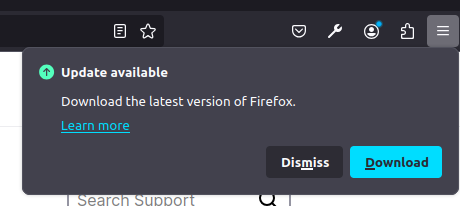
I'm using Firefox Developer Edition 132.0b3 (64 bit) which I downloaded just a few days ago. Already, there's an update for it, to version 132.0b4. Each time I open Firefox, there's this popup that tells me that there's an update available and that I need to download it. I'm using Linux Mint 21. I've already visited about:config and changed app.update.silent to true, changed app.update.manual to true, and changed app.update.url.details and app.update.url.manual to fake hyperlinks. Despite doing this and despite restarting, I'm still prompted about the update available every single time I open Firefox. Could someone kindly tell the specific developer who implemented this annoying feature, to please provide an option for Users to not be bothered with such popup notifications?
ps: Why does this website have a white background and not allow extensions to change it to a dark background? I have Dark Reader extension installed, but it says that it cannot make changes to this website. Even uBlockOrigin is unable to. Please either allow extensions to change the background, or at least change the background color of this website to dark. It gets strenuous on the eyes to keep staring at a bright white backgrond.
被采纳的解决方案
The Firefox versions on the Beta development channel tends to get eight updates in Testing, used to be fourteen. If you do not want to be a tester then use the current Release Fx 131.0
As for why you may not be able to affect *.mozilla.org pages with Extensions https://support.mozilla.org/en-US/kb/quarantined-domains
As for why no Dark Mode on support.mozilla.org well that is a bit complicated https://github.com/mozilla/protocol/issues/647
定位到答案原位置 👍 0所有回复 (3)
选择的解决方案
The Firefox versions on the Beta development channel tends to get eight updates in Testing, used to be fourteen. If you do not want to be a tester then use the current Release Fx 131.0
As for why you may not be able to affect *.mozilla.org pages with Extensions https://support.mozilla.org/en-US/kb/quarantined-domains
As for why no Dark Mode on support.mozilla.org well that is a bit complicated https://github.com/mozilla/protocol/issues/647
You need to use CSS code in userContent.css to be able to make changes to Mozilla pages like this forum, extensions can't do this and lifting this restriction is highly discouraged since these Mozilla domains have special permissions that allow access to the file system and the Windows registry.
Thank you. I'm not a tester. My objective of installing Firefox Developer edition was to be able to have more than one installations of Firefox. One installation without an automatic history deletion and one version with history deletion on close, and one installation with privacy extensions installed. One advantage of the Developer Edition was that it has a blue icon, which makes it easier to distinguish from the orange icon of the stable version, when I see it on the taskbar. Anyway, I guess I'll just install another stable version separately and change the ".desktop" file to point to a different colored icon. On the smartphone though, I'm glad that the developer edition does not nag me for updating it. In any case, even if a tester is using it, I believe it still would be good to allow the tester to set the duration/interval/boolean of update reminders.