

话题已存档。
如果需要帮助请提出新问题。

Solved
已存档
Change Folder Hierarchy in Local Folders after MailStore export

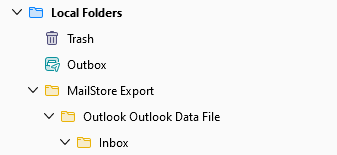
I have used MailStore Home to archive then export an Outlook PST file into Thunderbird. The Export appears to have worked, but I notice that the resulting file structure in Thunderbird Local Folders has "MailStore Export / Outlook Outlook Data File / Inbox", with all my folders residing under the inbox folder (which they should). Is there a way I can change the Local Folder structure to remove the top level "MailStore Export / Outlook Outlook Data File" and leave the top level as "Inbox"? See image.
I have used MailStore Home to archive then export an Outlook PST file into Thunderbird. The Export appears to have worked, but I notice that the resulting file structure in Thunderbird Local Folders has "MailStore Export / Outlook Outlook Data File / Inbox", with all my folders residing under the inbox folder (which they should). Is there a way I can change the Local Folder structure to remove the top level "MailStore Export / Outlook Outlook Data File" and leave the top level as "Inbox"? See image.
所有回复 (1)
选择的解决方案
I could drag and drop the Inbox folder to Local Folders to create another copy, and then delete the whole MailStore Export folder. Would this be the correct way to do it?