


Windows 10 已于2025年10月14日停止支持。如果您正在使用 Windows 10,参见 这篇文章

Windows 10 reached EOS (end of support) on October 14, 2025. If you are on Windows 10, see this article.

搜索 | 用户支持

防范以用户支持为名的诈骗。我们绝对不会要求您拨打电话或发送短信,及提供任何个人信息。请使用“举报滥用”选项报告涉及违规的行为。

详细了解

I am having trouble signing into Westpac Online banking. I have tried all the usual remedies with no luck

  • 2 个回答
  • 0 人有此问题
  • 171 次查看
  • 最后回复者为 SuMo Bot
  • 已存档

Westpac keep telling me it is the fault of my browser. While I was trying safe mode, deleting the cookies and cache etc. I came across this bit of odd information -

https://assets-prod.sumo.prod.webservices.mozgcp.net/media/uploads/images/2024-08-08-01-10-24-eb9193.png

Westpac have been telling me for two months that it is Firefox's fault, but I don't see how, given that it has always worked before. Finding this data makes me think the problem is Westpac's fault but they just keep saying the same old thing - use another browser. Well I don't want to! I have visual difficulties and my Firefox is heavily customised to account for that.

What is actually happening is that when I enter my information on the log In Page: https://banking.westpac.com.au/wbc/banking/handler?TAM_OP=login&logout=false then click on the sign in button the screne goes white like it is going to log in and then the sign in page comes back up without the information I had entered.

Is there any thing you can do to help me?

Yours Sincerely, Ms Jacq Felis.
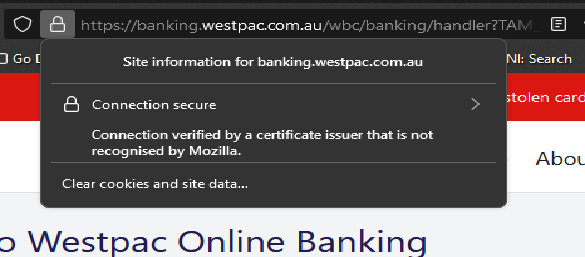
Westpac keep telling me it is the fault of my browser. While I was trying safe mode, deleting the cookies and cache etc. I came across this bit of odd information - https://assets-prod.sumo.prod.webservices.mozgcp.net/media/uploads/images/2024-08-08-01-10-24-eb9193.png Westpac have been telling me for two months that it is Firefox's fault, but I don't see how, given that it has always worked before. Finding this data makes me think the problem is Westpac's fault but they just keep saying the same old thing - use another browser. Well I don't want to! I have visual difficulties and my Firefox is heavily customised to account for that. What is actually happening is that when I enter my information on the log In Page: https://banking.westpac.com.au/wbc/banking/handler?TAM_OP=login&logout=false then click on the sign in button the screne goes white like it is going to log in and then the sign in page comes back up without the information I had entered. Is there any thing you can do to help me? Yours Sincerely, Ms Jacq Felis.
已附加屏幕截图

所有回复 (2)

If I haven't been clear , the problem still happens in Safe Mode. I have also tried shutting down and restarting with no luck!

Also try another version of Firefox (Beta, Dev, or Nightly) https://www.mozilla.org/en-US/firefox/channel/desktop. Make sure to install in a different directory from the current install.

What security software are you running?

由jonzn4SUSE于修改