


export function

I want to export mails only of a certain mail account (I have got 6). I would like not to export ALL accounts in ONE zip file but I want to have different zips. Is that possible? Why do I want that? I am active in 3 different organisations and I have a private account and - it can almost not be avoided - a google mail account. So when I look for a certain mail I know which zip I have to import and to look for it. Years ago I used MS outlook and I had the possibility to create archives as defined for each account and - if necessary and wanted - for each year. Is this also possible in Thunderbird? If yes HOW? Many thanks in advance!
所有回复 (3)
for each desired account - highlight on main view, - right-click and select 'settings' - select the copies&folders link - there you can tick the box to archive and then click the 'archive options' button to define structure. Messages can then be archived, but will not be zipped.
Sorry not to answer earlier. Many thanks for YOUR quick response! However, this is unfortunaltely not answering my question. Anyway, I found (in each account) "Server-Einstellungen" (settings) and "Nachrichtenspeicher" (copies&folders?). There I see the local folder ("Lokaler Ordner") where the mails are stored. I can also chose another folder ("Ordner wählen ..."). I CANNOT define a folder for one specific year and another for the next year, e.g. one folder for 2022 and one for 2023 etc. at a storage to be chosen e.g. my NAS box. Moreover I see that mails are stored (or archived) just for one year(!) even taking into account that in "Eigenschaften" (properties) and "Aufbewahrungsregeln" (storige regulation?) the setting "keine Nachrichten löschen" (no messages to be deleted) is activated (see attached screenshot). So currently I am LOOSING mails!!! Looking forward to your response!
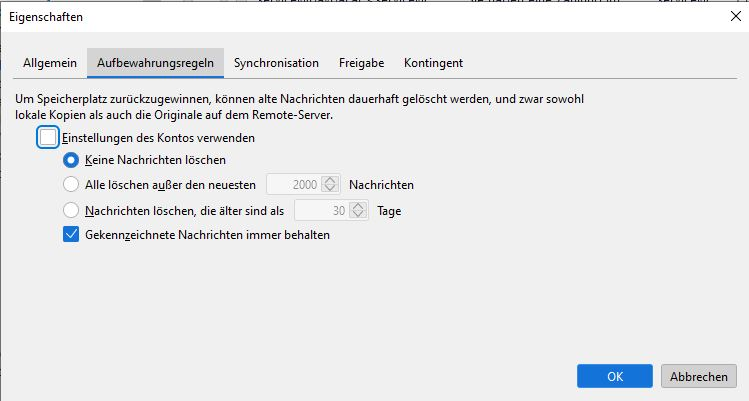
I'm still trying to learn your intent, as my response did speak to setting up individual archives per account per year. That would cause appropriate folders to be created and updated. If you want to save all messages without archiving, you might run a filter to copy all incoming mail to a local folder and the zip the folder at end of year. I do not believe you are losing mail. My suggestion is to find a way to let Thunderbird do the hard work for you; attempting to structure the process yourself causes the possible confusion we are experiencing. And, maybe it's just me.. :)