


Firefox started to ask me open mp4 links in other apps, instead of opening it in Firefox itself.
Before updating Firefox to 115.3.1esr, mp4 link used to open in the browser. Is there any fix?
被采纳的解决方案
Both add-ons didn't work. And I couldn't open the Mozilla's example video directly in the browser either.
I tried on another Firefox in different Laptop, and mp4 links could open in Firefox. It seems opening in Firefox function in my Firefox is broken...
And I found windows on the PC is broken, too. (I can't Windows Update) So I'll re-install OS, and Firefox too.
Thanks anyway.
定位到答案原位置 👍 0所有回复 (5)
Did you check the download actions ?
- Settings -> General -> Applications
- https://support.mozilla.org/en-US/kb/change-firefox-behavior-when-open-file
I tried, but somehow I can't choose "open in Firefox" option for mp4 files. Even I choose Firefox from the 'select other apps' menu, it's not applied.
When I set the option to "ask every time", I can choose Firefox in the pop-up window after clicking mp4 links. But in private mode, it's opened in non-private window...
Thank you for your assistance.
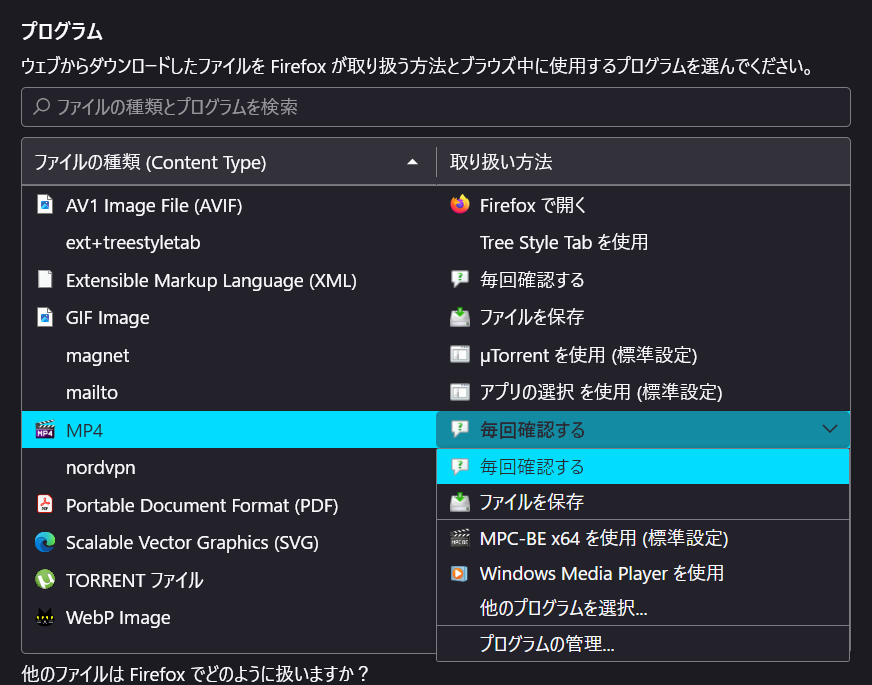
由Uiharu于修改
Are you able to play this video directly in the browser?
https://interactive-examples.mdn.mozilla.net/media/cc0-videos/flower.mp4
选择的解决方案
Both add-ons didn't work. And I couldn't open the Mozilla's example video directly in the browser either.
I tried on another Firefox in different Laptop, and mp4 links could open in Firefox. It seems opening in Firefox function in my Firefox is broken...
And I found windows on the PC is broken, too. (I can't Windows Update) So I'll re-install OS, and Firefox too.
Thanks anyway.