


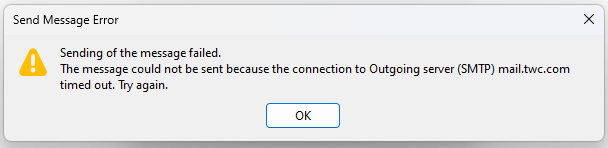
Bought a new HP PC, installed Thunderbird and now sending emails times out

I've verified that my email settings are correct...with 3 different Spectrum support people. They suggested I contact Thunderbird's support, so, here I am.
被采纳的解决方案
Did a Google search and found that I had to change from the default SSL/TLS setting to STARTTLS!
As soon as I did that, I got the prompt to enter my password, and BAM! everything is working now!
定位到答案原位置 👍 0所有回复 (6)
This may not work, but it's worth a try. - click settings>general and click the 'config editor' button near the bottom of pane - look for mailnews.tcptimeout and change the default of 100 to a higher number, such as 300
Thank you for trying to help me, David Unfortunately, you were correct, it didn't work. This sucks.
Maybe if you post a screenshot of your SMTP settings, someone will have a suggestion.
选择的解决方案
Did a Google search and found that I had to change from the default SSL/TLS setting to STARTTLS!
As soon as I did that, I got the prompt to enter my password, and BAM! everything is working now!
That's good news. I figured it may be simple, but when you said three spectrum people said settings were correct, I stayed quiet. Seems they were wrong. Thank you for the update.
You are very welcome! Yeah. They skipped a step in their setup instructions. No mention of changing SSL/TLS to STARTTLS. :(
Check it out:
Make sure to enter the following server settings: SSL: On Protocol: IMAP Port: 993 Port: 587 Requires Authentication: Yes, or checked