


TBird is over-counting new emails in my gmail account

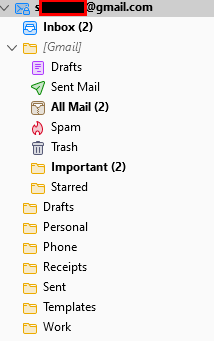
I have my gmail account installed (uses OAuth2) in TBird 102.6.1 64-bit. I've noticed that when the account is not expanded, it counts new mail 3 times! The mail appears it 3 folders: Inbox [Gmail] All Mail [Gmail] Important
I'd prefer it only counts the Inbox so when the account is not expanded, I see a true number of new emails.
被采纳的解决方案
Your image shows 2 unread mails in three folders. That is exactly how it is. Each of those folders has 2 unread mails in it. That they are the same email is simply unfortunate side effect of the multiple labels Google offer for new mail, not a fault in the software that receives three copies of the same email from Google.
I unsubscribed from the important folder years ago because really I only want to see one copy of mail not multiples. We also recommend unsubscribing from the all mail folder as it is a duplication of mail offered up else where in other folders.
You can also get rid of the ridiculous [Gmail] structure by correctly setting the IMAP server directory to [Gmail] in account settings > server settings > advanced.
If by some obscure chance you are talking about the icon badge with the count. It has two setting in options. A count of unread messages and a count of new message, or you an just turn it off as I have done because it only reports 99+ on all the time anyway. Turning it off means the count will never be wrong.
定位到答案原位置 👍 1所有回复 (4)
That is three mails. Each one in each folder is separate and unread.
My point is that each email is counted three times (once from each folder.) If for the account, I could specify to have it count only the new mail in the inbox, it would make more sense to me - especially since the inbox is a folder at the same level as the Gmail folder.
选择的解决方案
Your image shows 2 unread mails in three folders. That is exactly how it is. Each of those folders has 2 unread mails in it. That they are the same email is simply unfortunate side effect of the multiple labels Google offer for new mail, not a fault in the software that receives three copies of the same email from Google.
I unsubscribed from the important folder years ago because really I only want to see one copy of mail not multiples. We also recommend unsubscribing from the all mail folder as it is a duplication of mail offered up else where in other folders.
You can also get rid of the ridiculous [Gmail] structure by correctly setting the IMAP server directory to [Gmail] in account settings > server settings > advanced.
If by some obscure chance you are talking about the icon badge with the count. It has two setting in options. A count of unread messages and a count of new message, or you an just turn it off as I have done because it only reports 99+ on all the time anyway. Turning it off means the count will never be wrong.
Thanks Matt. I wasn't aware I could clean up the structure as you pointed out.
/steve