


Firefox on Mac (102.0.1) displays random (trash) text, not English or another language

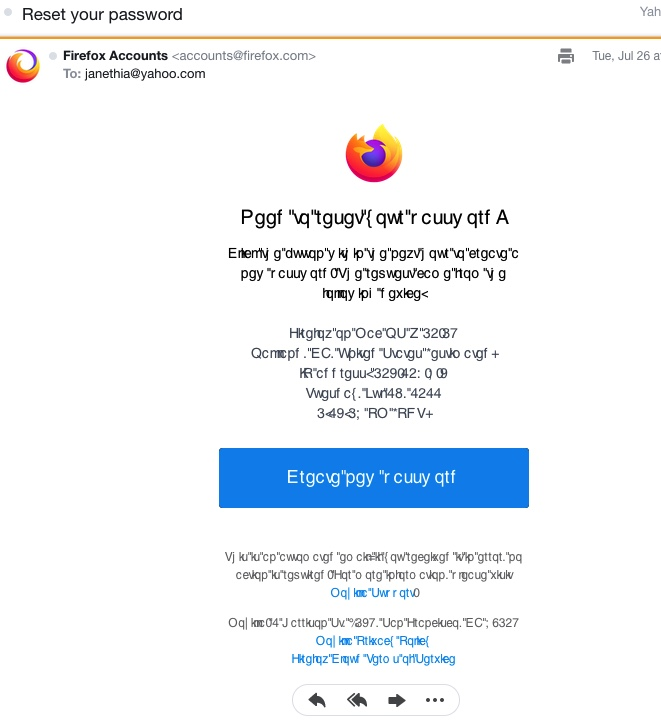
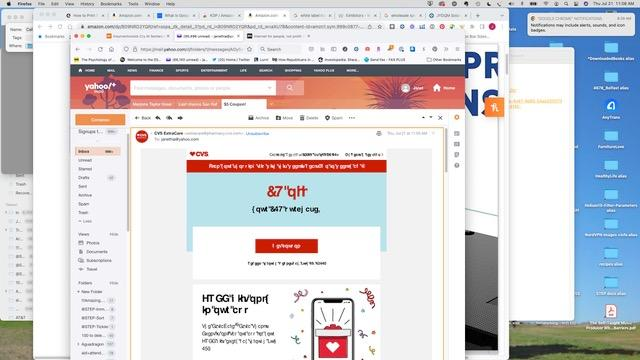
Please give me very simple instructions on getting Firefox not to display trash text. I am sending a screen shot. The trash text seems to be a problem when I open an email in Firefox only, not Safari or Chrome. Problem occurs in both of the two email clients I use: Yahoo or Apple Mail.
--What I Did With The Problem-- I went to the Mozilla Community for what to do about random text showing up and found a couple suggestions for command line “fixes" from a few years back. I don’t know if they would have worked for my problem, since the problem they were fixing didn’t sound exactly like mine. Also it has been 30 years or so since I used a command line interface. Not wanting to start with that now.
I tried reinstalling Firefox. No change.
I tried translating a line of text from Turkish to English (it looked to me of Turkish, and no, I don't know any Turkish) and it translated. But when I tried with Hmong and Spanish, the same line translated to English. I abandoned this “test.”
I tried looking for more help at mozilla.com on Facebook and found a Help page that seemed more concerned with Indian politics and Excel fixes than Firefox.
--Please Help-- This is my default browser and has been for years and years. Now I am using Safari as my default. Yeow! It hurts! I’ve been dealing with this for a couple weeks now. It is getting OLD.
所有回复 (1)
You can check in Font Book for font issues like corrupted and duplicate fonts.
You can right-click and select "Inspect" to open the built-in Inspector with this element selected.
You can check in the Rules tab in the right panel in the Inspector what font-family is used for selected text. You can check in the Fonts tab in the right panel in the Inspector what font is actually used because Firefox might be using a different font than specified by the website.