


Windows 10 已于2025年10月14日停止支持。如果您正在使用 Windows 10,参见 这篇文章

Windows 10 reached EOS (end of support) on October 14, 2025. If you are on Windows 10, see this article.

搜索 | 用户支持

防范以用户支持为名的诈骗。我们绝对不会要求您拨打电话或发送短信,及提供任何个人信息。请使用“举报滥用”选项报告涉及违规的行为。

详细了解

话题已关闭并存档。 如果需要帮助请提出新问题。

Saving e-Mail

  • 1 个回答
  • 1 人有此问题
  • 180 次查看
  • 最后回复者为 sfhowes
  • 已锁定

Recent Thunderbird update, 91.5.1 and maybe the previous, when I want to Save and e-Mail, Thunderbird gives an excessive name beginning with the e-Mail Subject, then the Sender's EMail Addree, then the Date. For 20-plus years my Netscape e-Mail, and then Thunderbird only gave the Subject as the initial file name. I am very very used to working with the Subject, only. Now I have to go into the e-Mail name and Delete the Sender's EMail Address and the Date. Is there a way to get the program to only save as the Subject line, without having to correct each and every e-Mail I want to save?

Recent Thunderbird update, 91.5.1 and maybe the previous, when I want to Save and e-Mail, Thunderbird gives an excessive name beginning with the e-Mail Subject, then the Sender's EMail Addree, then the Date. For 20-plus years my Netscape e-Mail, and then Thunderbird only gave the Subject as the initial file name. I am very very used to working with the Subject, only. Now I have to go into the e-Mail name and Delete the Sender's EMail Address and the Date. Is there a way to get the program to only save as the Subject line, without having to correct each and every e-Mail I want to save?

所有回复 (2)

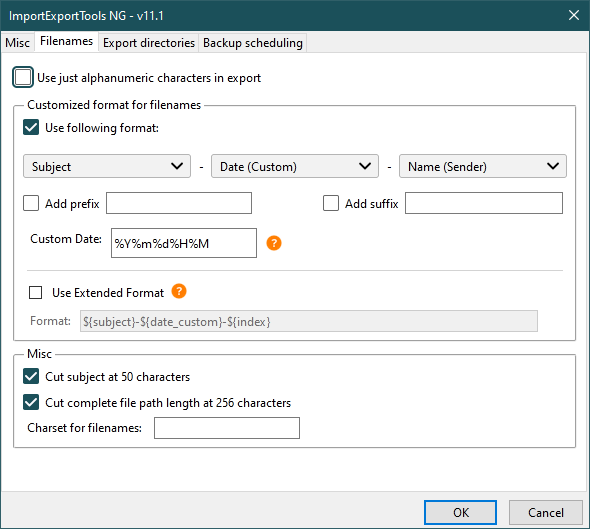
The ImportExportTools NG add-on allows custom filenames (see picture).
This question has been locked because the original author has deleted their account. While you can no longer post new replies, the existing content remains available for reference.