


DELETING PASSWORDS WHEN LOGGED OUT/NOT SYNCED

Okay, so I decided to sync my Firefox from my laptop with my work computer. I wasn't thinking about it also making all my passwords available on my work computer, which I do not want. I thought just signing out and using the browser 'un synced' would mean the passwords weren't available, but nope. While signed out, if click into passwords I can still see them all. So my question: If I delete the passwords from here (signed out) on my work computer, will it also delete them from my laptop browser (that is signed in)?
被采纳的解决方案
See How do I choose what information to sync on Firefox?. Before doing anything you should turn off syncing Logins and passwords on that computer.
定位到答案原位置 👍 2所有回复 (4)
After signing out, you should see a modal window Disconnect? with a checkbox Delete data from this device (passwords, history, bookmarks, etc.).
You have to select that checkbox to remove data from your work computer. Synced data will remain in your account.
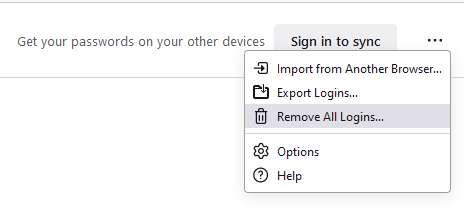
Thanks! This works, but the problem is it also removes all my bookmarks/toolbar which I would like to retain. I only want to remove the login/passwords. This is a screenshot of the Passwords section (signed out). If I click Remove All Logins, will that only delete them from this computer?
选择的解决方案
See How do I choose what information to sync on Firefox?. Before doing anything you should turn off syncing Logins and passwords on that computer.
Thank you! I unchecked the appropriate boxes, logged out, Removed All Logins and restarted. Voila!