


Cloudflare loop "checking your browser before accessing"

This issue is with me for some time now I guess 6 to 12 months, I have circumvented it by simply using other browsers that don't have the issue, it is only in Firefox.
I have noticed that it seems to be a reoccurring issue for many people reading through help topics.
At the moment I am using: Mozilla Ubuntu Firefox 91.0
Mozilla/5.0 (X11; Ubuntu; Linux x86_64; rv:91.0) Gecko/20100101 Firefox/91.0
Starting Firefox in "Safe mode/Troubleshooting mode" through the "Application menu" -> "Help" -> "Troubleshoot Mode", doesn't fix the problem.
... "Did you check the date/time and time zone on your computer?" (As suggested in an older topic)
Automatic synchronization with an Internet time server, is set to "ON"
My "Time Zone" is set manually set to the correct "Time Zone"
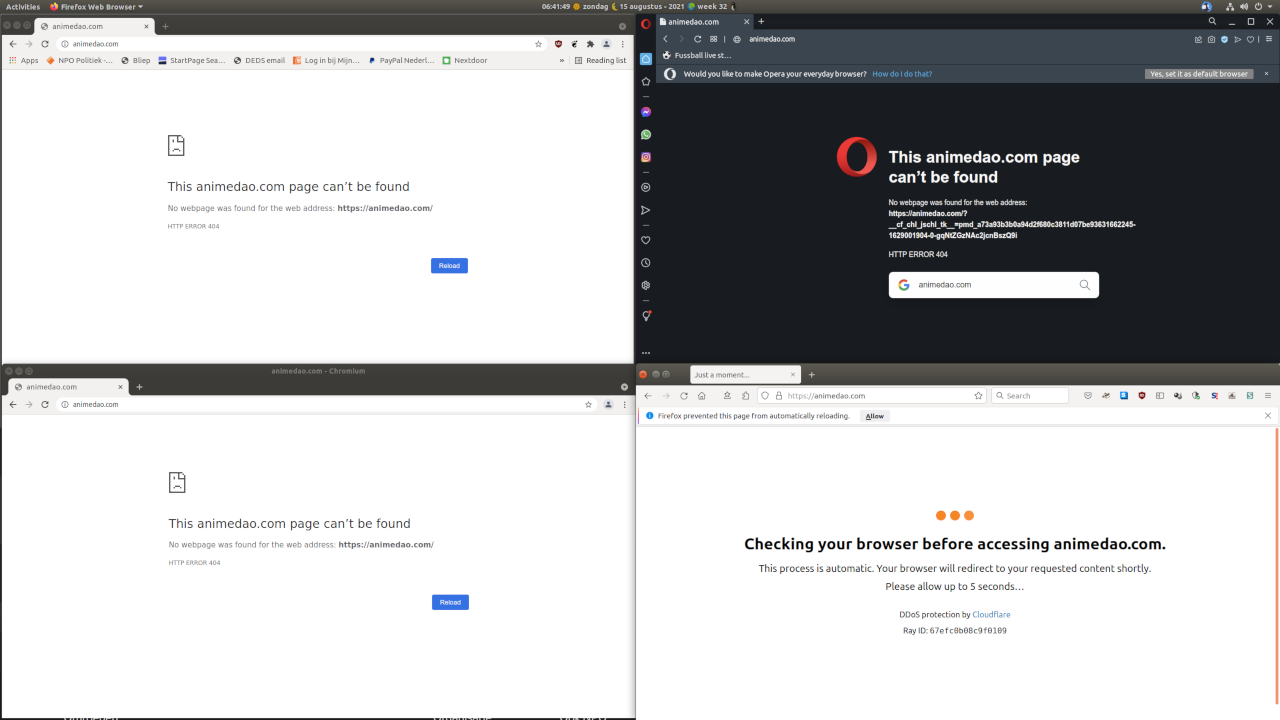
Since the issue is only in Firefox and not in Chrome, Chromium or Opera, there is something that Firefox is doing that Cloudflare doesn't like or visa versa....
I have noticed in other posts that the blame is simply shifted to Cloudflare, but why do other browsers then not have this problem ?
Opening the no longer existing website (from another help topic here about the same issue), that is still known by Cloudflare, shows the problem if you got it too -> http://animedao.com/
See my uploaded screenshot to see it is only in Firefox.
被采纳的解决方案
I just found a (weird) solution to the problem in https://github.com/manga-download/hakuneko/issues/2933 ...
It seems Cloudflare is bouncing the request due to not liking my real/true "User agent" :
Mozilla/5.0 (X11; Ubuntu; Linux x86_64; rv:91.0) Gecko/20100101 Firefox/91.0
When faking my "User agent"to "Mozilla/5.0 (Windows NT 10.0; Win64; x64; rv:83.0) Gecko/20100101 Firefox/83.0" (With User-Agent-Switcher) I get past the Cloudflare reloading headache.
So this indeed seems to be Cloudflare refusing access to legit Firefox Ubuntu Builds that come from the genuine Ubuntu repository.
I guess I will have to take this up with Cloudflare after all
定位到答案原位置 👍 0所有回复 (2)
选择的解决方案
I just found a (weird) solution to the problem in https://github.com/manga-download/hakuneko/issues/2933 ...
It seems Cloudflare is bouncing the request due to not liking my real/true "User agent" :
Mozilla/5.0 (X11; Ubuntu; Linux x86_64; rv:91.0) Gecko/20100101 Firefox/91.0
When faking my "User agent"to "Mozilla/5.0 (Windows NT 10.0; Win64; x64; rv:83.0) Gecko/20100101 Firefox/83.0" (With User-Agent-Switcher) I get past the Cloudflare reloading headache.
So this indeed seems to be Cloudflare refusing access to legit Firefox Ubuntu Builds that come from the genuine Ubuntu repository.
I guess I will have to take this up with Cloudflare after all
由allemaal_onzin于修改