


i cant find screens shoot tools ?

in the past screen shoot add was appear when " Right-click on an empty part of the page and select Take Screenshot " but since the last update i cant found it ! i tried to do what is written in this article https://support.mozilla.org/en-US/kb/take-screenshots-firefox but i think its not work now
被采纳的解决方案
Your screenshot shows that the preference is marked 'true'. It should be marked 'false'. I have it in the context menu in Firefox 90.0.2. If you can't get it, there is a toolbar button for screenshot in "Customize Toolbar". To get the customize page right-click a toolbar or use the 3 bar menu > More Tools.
定位到答案原位置 👍 1所有回复 (4)
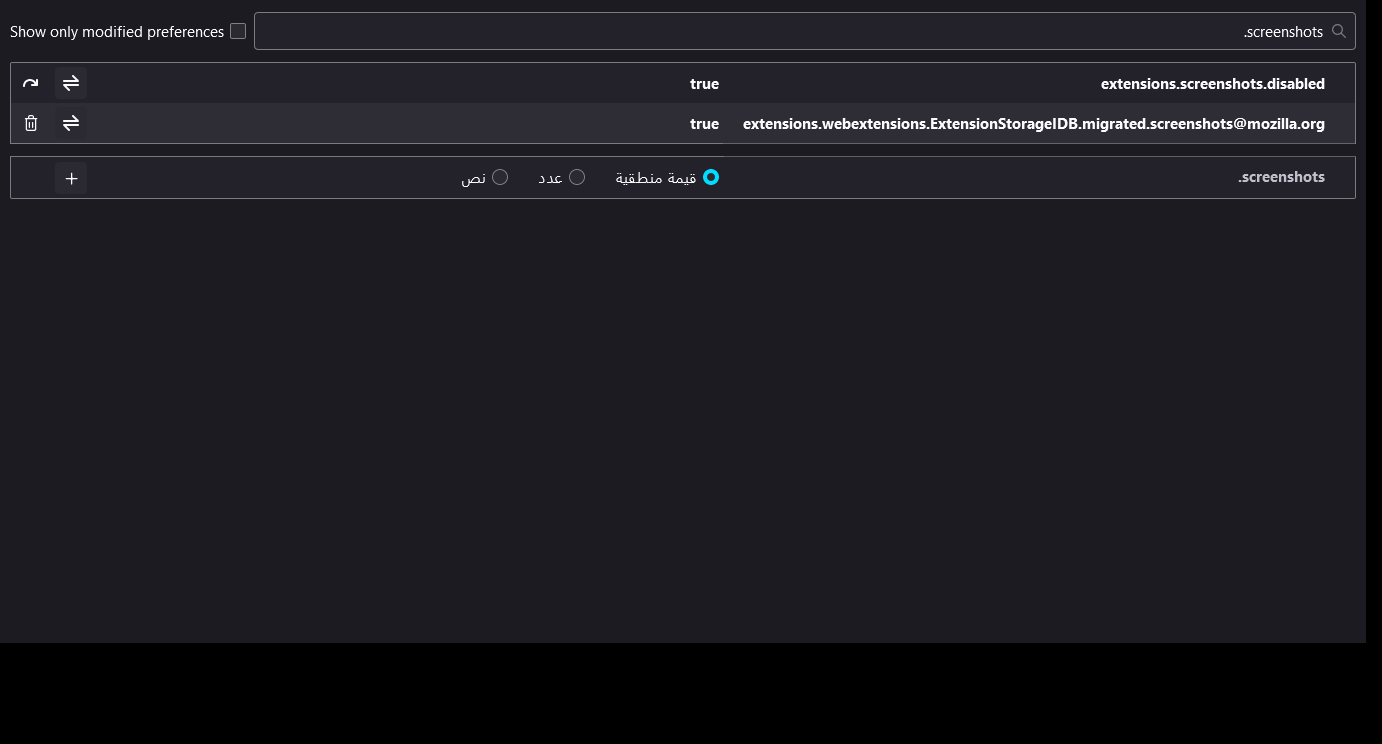
Enter about:config in the address bar and check the value of the extensions.screenshots.disabled preference.
i did that already but that didnt solve the problem

选择的解决方案
Your screenshot shows that the preference is marked 'true'. It should be marked 'false'. I have it in the context menu in Firefox 90.0.2. If you can't get it, there is a toolbar button for screenshot in "Customize Toolbar". To get the customize page right-click a toolbar or use the 3 bar menu > More Tools.
TerryN21 said
Your screenshot shows that the preference is marked 'true'. It should be marked 'false'. I have it in the context menu in Firefox 90.0.2. If you can't get it, there is a toolbar button for screenshot in "Customize Toolbar". To get the customize page right-click a toolbar or use the 3 bar menu > More Tools.
yeah thats work now thank you