


Saved Logins Not Wanted

I have never asked for logins to be saved. Now saved logins comes up when I try to sign in to my email. I do not like it!! I travel with my computer and do not want my passwords automatically entered.
How do I get rid of any logins that have been saved?
What did they do with Firefox? Are they trying to kill it?
I have never asked for logins to be saved. Now saved logins comes up when I try to sign in to my email. I do not like it!! I travel with my computer and do not want my passwords automatically entered.
How do I get rid of any logins that have been saved?
What did they do with Firefox? Are they trying to kill it?
所有回复 (2)
Hi essystems,
- Click on menu icon
- Click on Settings.
- Choose Privacy & Security from left menu.
- Untick Autofill Logins and Passwords from Logins and Passwords toolbar.
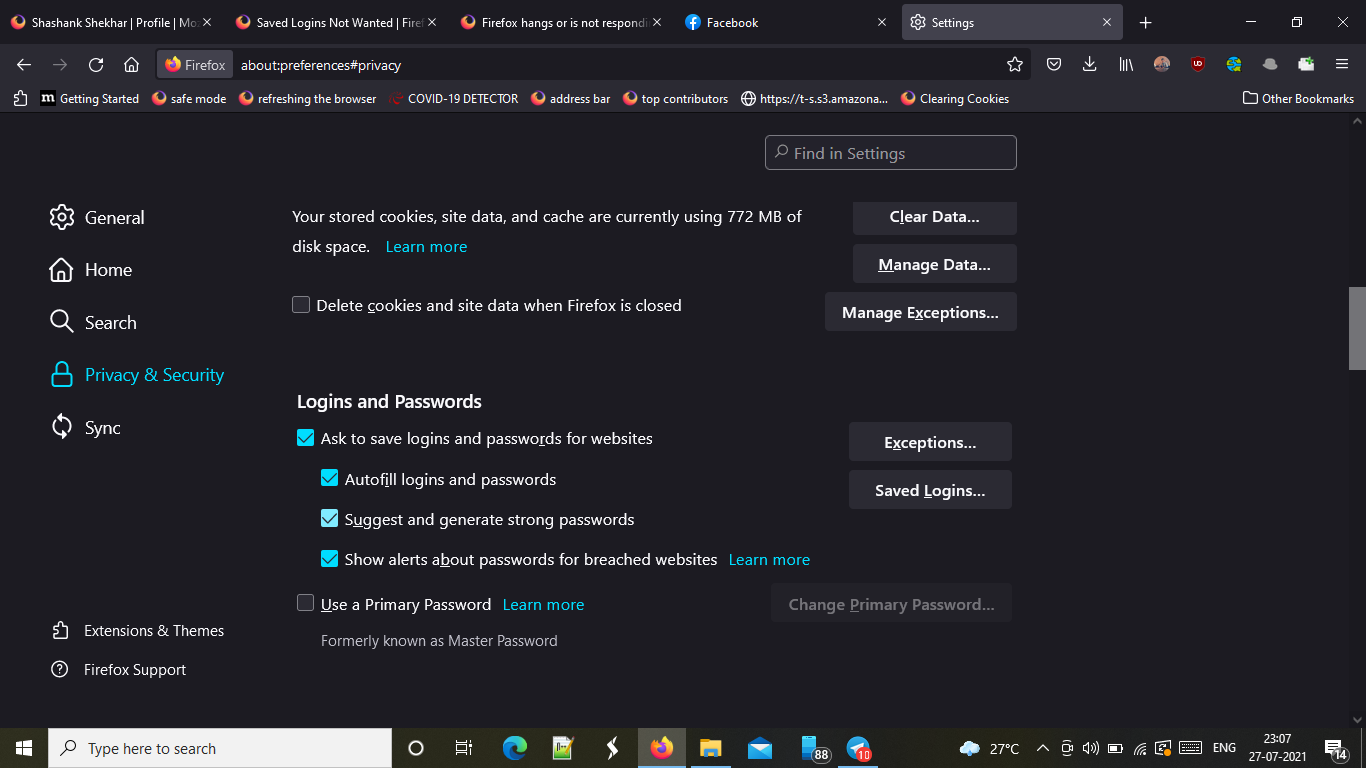
You probably want to also un-check the "Ask to save logins..." box if you want to completely disable the password manager.
You can delete any already saved logins through the Lockwise UI as described in this article:
Password Manager - Remember, delete and edit logins and passwords in Firefox