


Send link by mail

Hi, After today's update the small menu right to the website bar is missing. There was a menu that opened by clicking the 3 points. One of the options was to send the website link directly to an email address. This menu/the points are not there anymore. Where can I find this feature now? It was really helpful for my daily work.
被采纳的解决方案
Hi,
As of Firefox 89, the meatball/thre-dots/page action menu was removed from the URL bar and the options were moved to either tab context menu or the page context menu. Here is how you can find alternative ways to access the various options from the old page action:
- Bookmark Current Tab: You can click the "star" icon to save the page as bookmark. Alternatively, you can right-click on the tab and choose Bookmark Tab.
- Save Page to Pocket: You can add the Save Page to Pocket menu to Toolbar from the Customize Tool menu.
- Pin Tab: Right-click on the tab and choose Pin Tab.
- Copy Link: Click on the URL bar and press (Ctrl+C) for Windows and Linux or (command+C) for Mac.
- Email Link: You can add the Email Link button to the Toolbar from the Customize tab.
- Take Screenshot: Right click on the empty part of a page and choose Take Screenshot. More about that: Take screenshots in Firefox.
- Send Tab to Device: Right-click on the tab and choose Send Tab to Device.
- Share: Right click on the tab and choose Share.
所有回复 (5)
选择的解决方案
Hi,
As of Firefox 89, the meatball/thre-dots/page action menu was removed from the URL bar and the options were moved to either tab context menu or the page context menu. Here is how you can find alternative ways to access the various options from the old page action:
- Bookmark Current Tab: You can click the "star" icon to save the page as bookmark. Alternatively, you can right-click on the tab and choose Bookmark Tab.
- Save Page to Pocket: You can add the Save Page to Pocket menu to Toolbar from the Customize Tool menu.
- Pin Tab: Right-click on the tab and choose Pin Tab.
- Copy Link: Click on the URL bar and press (Ctrl+C) for Windows and Linux or (command+C) for Mac.
- Email Link: You can add the Email Link button to the Toolbar from the Customize tab.
- Take Screenshot: Right click on the empty part of a page and choose Take Screenshot. More about that: Take screenshots in Firefox.
- Send Tab to Device: Right-click on the tab and choose Send Tab to Device.
- Share: Right click on the tab and choose Share.
Many thanks Seburo!

Please give a simple easy method to restore the three dot link n the tool bar by the pocket symbol ..
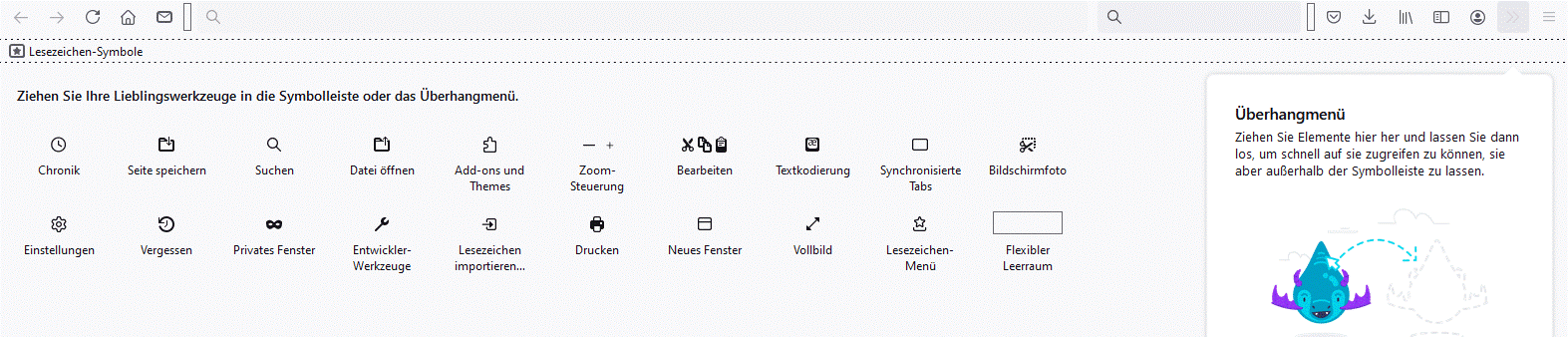
It is very easy. Just go to the toolbar, select the 3 lines at the very right, press the right mouse button, go to "customize toolbar". Then many features/symbols show up. Choose the envelope symbol and move it to the main toolbar. A Screenshot is attached - hope it helps, even though in German ;-)

See this Mozilla Support article on how to add an Email Link toolbar button and other customizations: Customize Firefox controls, buttons and toolbars