

话题已存档。
如果需要帮助请提出新问题。

已存档
Firefox can't allow permanent access to my screen when using Google Meet
Hi everyone,
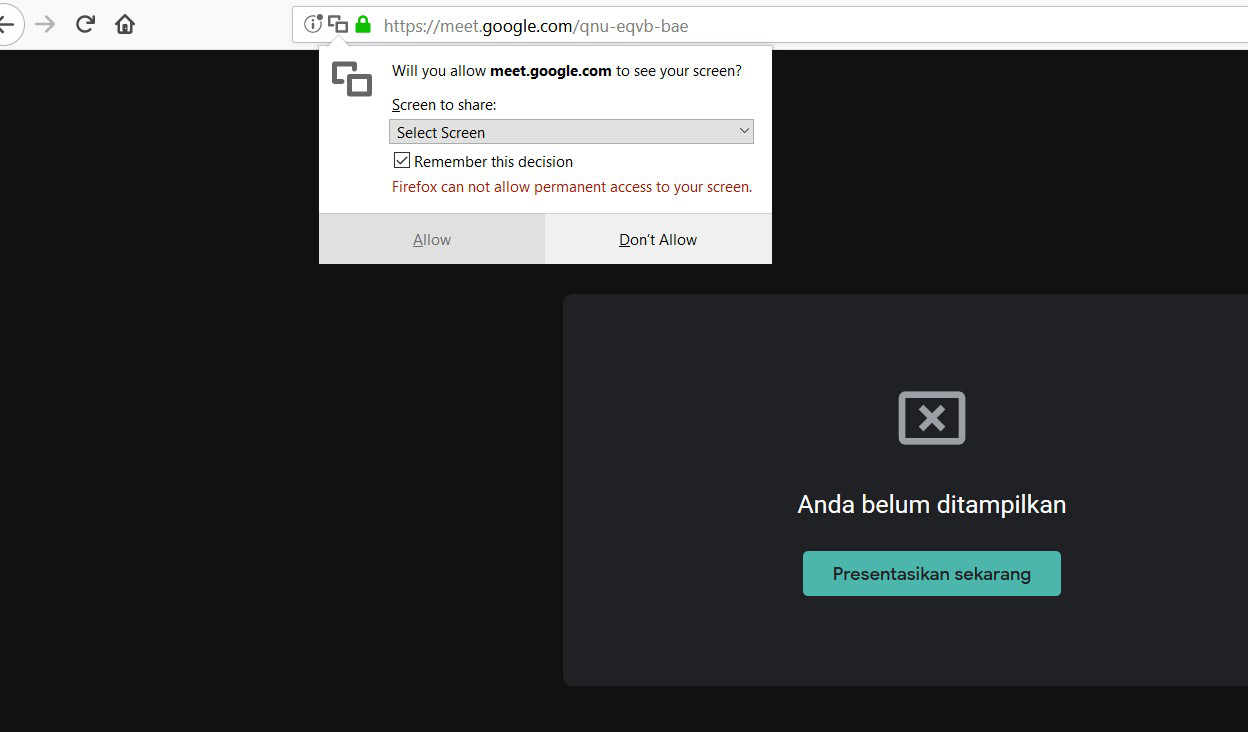
I can't share my screen when using Google Meet on my Windows laptop. I've been trying to find the menu or options on Firefox with hope I can change it, but no where to be found. I've tried from screen sharing option on Google Meet, but it says "Firefox can not allow permanent access to your screen.".
Can anyone help? I can share my screen when using other application like Zoom, but now with Google Meet app. Here I have the screenshot.
Thank you!
Verdian
Hi everyone,
I can't share my screen when using Google Meet on my Windows laptop. I've been trying to find the menu or options on Firefox with hope I can change it, but no where to be found. I've tried from screen sharing option on Google Meet, but it says "Firefox can not allow permanent access to your screen.".
Can anyone help? I can share my screen when using other application like Zoom, but now with Google Meet app. Here I have the screenshot.
Thank you!
Verdian
所有回复 (1)
It just means you have to un select "Remember this decision" and it'll ask you every time you wanna do it through google meet. Unfortunately, as Firefox says, it's a security issue to allow permanent access to your screen.