

话题已存档。
如果需要帮助请提出新问题。

Solved
已存档
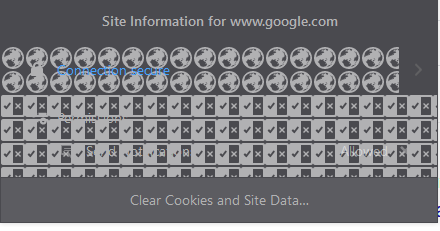
Site Information drop-down is corrupted
The "Site information" drop down on the far left of the address bar is corrupted, showing an infinitely repeating pattern of icons. See attached picture for example.
The "Site information" drop down on the far left of the address bar is corrupted, showing an infinitely repeating pattern of icons. See attached picture for example.
所有回复 (2)
选择的解决方案
Hi cormac, that is a known issue with ShadowFox.
As a temporary (?) workaround, you can edit out its rules related to the Site Identity Area. There are steps for that in this issue:
https://github.com/overdodactyl/ShadowFox/issues/284
Does that work for you?
I completely forgot I even had ShadowFox installed. There is a pull request with a fix, and using that solved the issue. Thank you for the help!