


Thunderbird 77.0b3 trying reset master password
On Win 10. trying to use: openDialog("chrome://pippki/content/resetpassword.xul") No evaluate button, tried "Run" in Developer Tools > Error Console.
result: 10:58:24.639 openDialog("chrome://pippki/content/resetpassword.xul") 10:58:24.711 TypeError: this.mm is null amInstallTrigger.jsm:44:3 10:58:43.230 TypeError: this.mm is null amInstallTrigger.jsm:44:3 10:58:59.119 NotSupportedError: CustomElementRegistry.define: 'conversation-browser' has already been defined as a custom element conversation-browser.js:853
Opens a window "File not found" The file jar:file:///C:/Program Files (x86)/Mozilla Thunderbird/omni.ja!/chrome/pippki/content/pippki/resetpassword.xul cannot be found. Please check the location and try again.
Trying to remove master password. Got set in error as windows pop up while typing message; hence, no idea as to what it would have been set to.
I am somewhat sure this command has been changed, but unable to find reference to 77.0b3.
所有回复 (5)
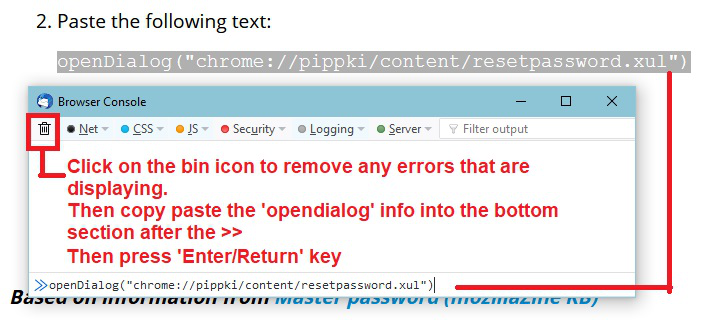
I've posted some images below that should help.
- Tools > Developer Tools > Error console
- Clear the error console content.
- At the bottom where you see >>
- paste in openDialog("chrome://pippki/content/resetpassword.xul")
- Press Enter key
Then you should get another pop up window that offers 'Reset'


Thanks for helping: pasted in : openDialog("chrome://pippki/content/resetpassword.xul")
error: Expected 'none', URL, or filter function but found 'alpha(', Error in parsing value for 'filter'. Declaration dropped.
As you are using a beta, I would first check that you have got a good installation.
Uninstall Thunderbird program and then get a fresh download from here:
I notice the info you supplied mentions Program Files (x86), so you are using a Thunderbird windows32bit version. Hence I've located that specific download location.
The link above takes you to where you can get a fresh installation. You need to select your preferred language eg: en-GB = English British. Then click on the 'Thunderbird Setup 77.0b3.exe' link to download.
Tried installing new x64 (back one directory level,. Same results in that I can not reset master password in order to remove it. Never came up with a choice (Buttons)
In the Error Console,
Entered: openDialog("chrome://pippki/content/resetpassword.xul")
Result: 18:54:21.951 openDialog("chrome://pippki/content/resetpassword.xul") 18:54:22.001 ChromeWindow about:blank
After digging around in Bugzilla for a lot longer than it should have taken I now know why this does not work as advertised. Change the line you paste to openDialog("chrome://pippki/content/resetpassword.xhtml"
Bug 1596869 renamed the XUL files in security/manager/pki/ to xhtml files.