


Favicons are not loading properly
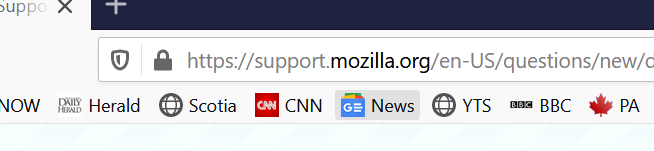
I am using Firefox 70 on Windows 10 (Nov. Update installed) and the favicons for some sites do not load. They work fine with Chrome Version 78. See attached screenshots.
This has been an issue for quite sometime, could actually be a year or two possibly longer.
The favicons also work fine on my iPhone ios 13.

所有回复 (5)
Hello,
Many site issues can be caused by corrupt cookies or cache. In order to try to fix these problems, the first step is to clear both cookies and the cache. Note: This will temporarily log you out of all sites you're logged in to. To clear cache and cookies do the following:
- (Firefox 57 and above) Click the Library button
 and choose History.
(Click the menu button and choose History in older Firefox versions.)
- In the History menu, choose "Clear Recent History...".
- Under "Time range to clear", select "Everything".
- Now, click the arrow next to Details to toggle the Details list active.
- From the details list, check Cache and Cookies and uncheck everything else.
- Now click the "Clear Now" button.
Further information can be found in the Delete browsing, search and download history on Firefox article.
Did this fix your problems? Please report back to us!
Thank you.
Hello
This did Not solve my problem, I should have mentioned that I did a fresh installation of Windows on Nov 17, 2019
Is this about favicons for a bookmark (i.e. you bookmarked as web page) or about the favicon on the tab bar ?
You can try these steps in case of issues with web pages:
You can reload web page(s) and bypass the cache to refresh possibly outdated or corrupted files.
- hold down the Shift key and left-click the Reload button
- press "Ctrl + F5" or press "Ctrl + Shift + R" (Windows,Linux)
- press "Command + Shift + R" (Mac)
Clear the Cache and remove the Cookies for websites that cause problems via the "3-bar" Firefox menu button (Options/Preferences).
"Remove the Cookies" for websites that cause problems:
- Options/Preferences -> Privacy & Security
Cookies and Site Data -> Manage Data
"Clear the Cache":
- Options/Preferences -> Privacy & Security
Cookies and Site Data -> Clear Data -> Cached Web Content: Clear
Start Firefox in Safe Mode to check if one of the extensions ("3-bar" menu button or Tools -> Add-ons -> Extensions) or if hardware acceleration is causing the problem.
- switch to the DEFAULT theme: "3-bar" menu button or Tools -> Add-ons -> Themes
- do NOT click the "Refresh Firefox" button on the Safe Mode start window
- https://support.mozilla.org/en-US/kb/troubleshoot-firefox-issues-using-safe-mode
- https://support.mozilla.org/en-US/kb/troubleshoot-extensions-themes-to-fix-problems
You can check for problems with the places.sqlite and favicons.sqlite files in the Firefox profile folder.
- use "Verify Integrity" button on the "Help -> Troubleshooting Information" (about:support) page
In case errors are reported with "Verify Integrity" close and restart Firefox and retry.
Hello, This issue is about favicons for a bookmark. (I thought I attached screenshots) This is a brand new windows installation. Firefox was just installed Sunday Nov. 17, 2019. So Cache and cookies are not the issue. Disabling hardware acceleration has no effect.
I give up, uninstalled Firefox and am now using Chrome with no issues.
Trev
Did you try to use (click) the bookmark to visit this website link?
If that doesn't give a highlighted star on the Navigation Toolbar then try to edit the bookmark or create a new bookmark.
You didn't confirm whether you see the favicon on the tab if you visit this link.