


Windows 10 已于2025年10月14日停止支持。如果您正在使用 Windows 10,参见 这篇文章

Windows 10 reached EOS (end of support) on October 14, 2025. If you are on Windows 10, see this article.

搜索 | 用户支持

防范以用户支持为名的诈骗。我们绝对不会要求您拨打电话或发送短信,及提供任何个人信息。请使用“举报滥用”选项报告涉及违规的行为。

详细了解

Delay in PDF attachment download/open

  • 1 个回答
  • 1 人有此问题
  • 117 次查看
  • 最后回复者为 christ1
  • 已存档

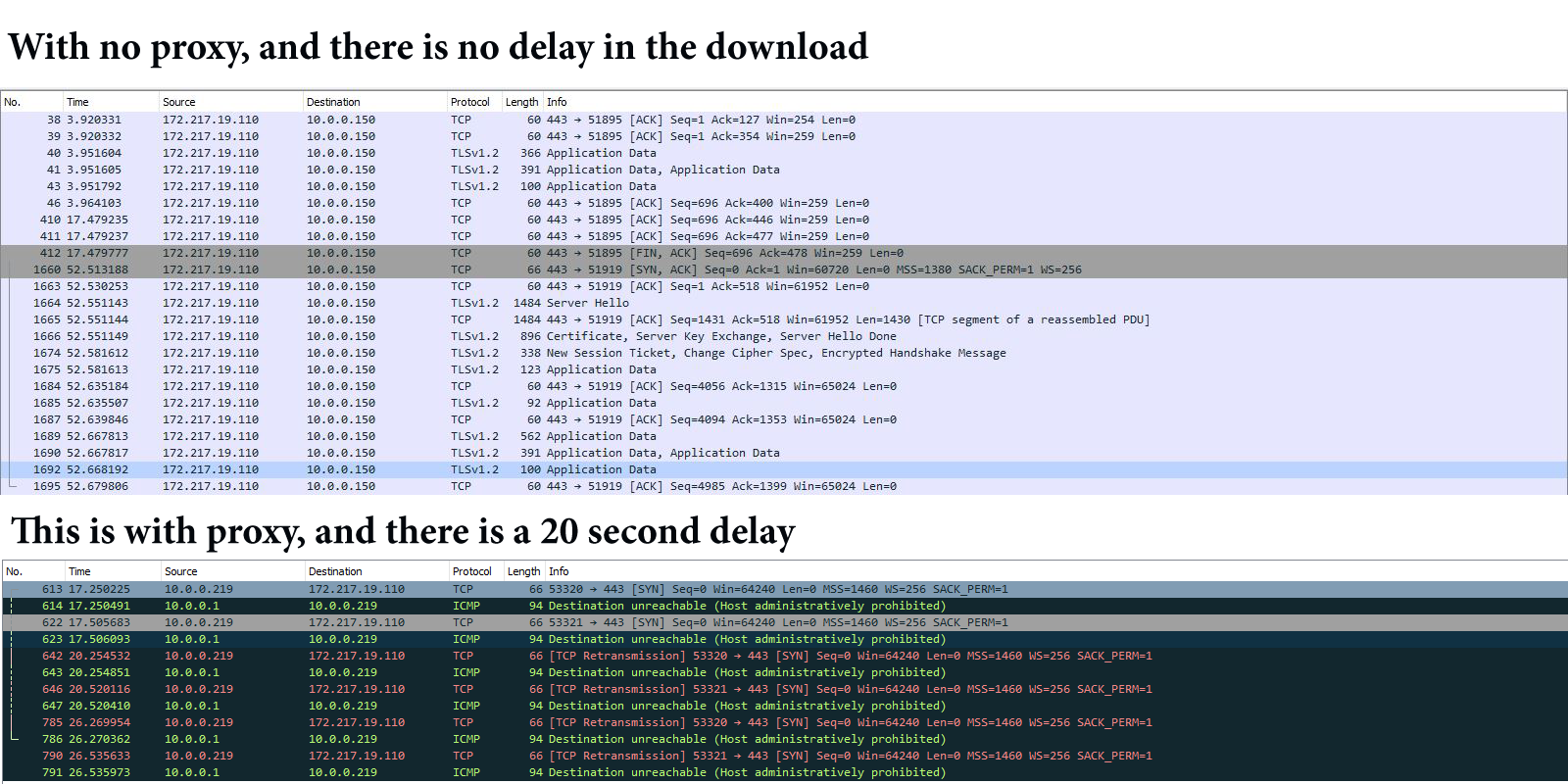
We are using Thunderbird for a couple of years. About week ago we started havin problems with the pdf files... yes.... and only the pdf files. When i try to download/open a pdf file from the attachment, i have to wait about 20 second for 100 kb pdf file, and this problem is not from the size of the attachment because i have tried with a 50 mb pdf file with the same result. The problem is that we are using proxy for network filtering and with the help of the Wireshark i have found, that every time you try to open or download a pdf file in thunderbird, a communication is started with this IP 172.217.19.110 . It seems that you have to wait until it gets a time out, and after that you can open/download your pdf file.

As you can see in the picture, if i disable the proxy filter for my ip everything is working like it should.
We are using Thunderbird for a couple of years. About week ago we started havin problems with the pdf files... yes.... and only the pdf files. When i try to download/open a pdf file from the attachment, i have to wait about 20 second for 100 kb pdf file, and this problem is not from the size of the attachment because i have tried with a 50 mb pdf file with the same result. The problem is that we are using proxy for network filtering and with the help of the Wireshark i have found, that every time you try to open or download a pdf file in thunderbird, a communication is started with this IP 172.217.19.110 . It seems that you have to wait until it gets a time out, and after that you can open/download your pdf file. As you can see in the picture, if i disable the proxy filter for my ip everything is working like it should.
已附加屏幕截图

所有回复 (1)

Then may be something has changed on the proxy, and it doesn't allow mail protocols anymore? This doesn't look like a Thunderbird problem.