


I cannot print my emails - just get a blank page with a date footer.

This is a recent problem. When I try to print an email I just get a blank page except for a date footer. Print preview also shows a blank page.
所有回复 (7)
re :Print preview Maybe your margins are too wide so nothing can be shown.
What 'Scale' % is selected ? Suggest you initally use 100%
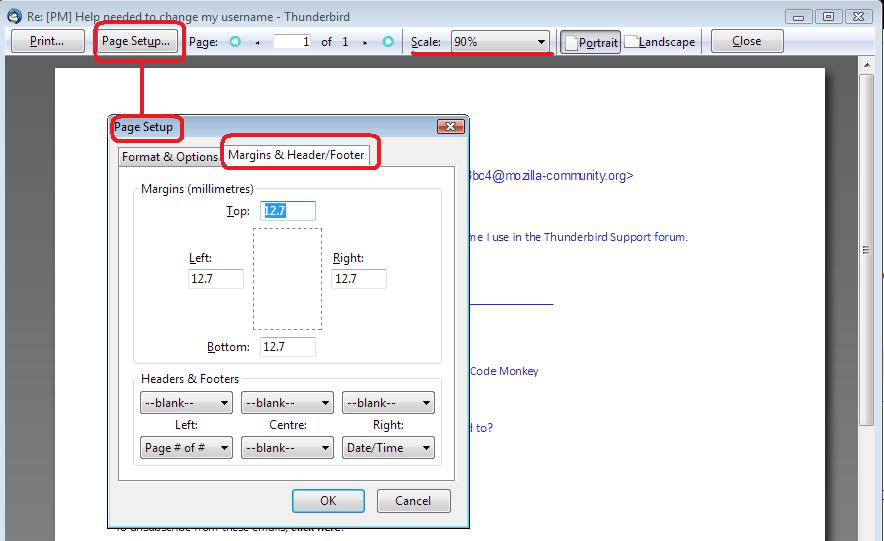
click on 'Page Setup' button. select 'Margins & Header/Footer' tab What are the Margins ? If using millimeters: suggest you set up Top, Bottom, Left , right to use 12.7
If using inches: suggest you set up Top, Bottom, Left , right to use 0.5
click on 'OK' see image below as guide.
Thanks for your response. Scale is 100%. When I click on Page Setup button I just get an empty box, the top of which I cannot see or move to.
Printer (Canon MP550) has been here for a few years now. Paper is set at A4. Went to the reset process as above, there are many lines for the printer in 'bold'. Do I need to reset all of them? There are also lines for a printer I no longer use. Should I delete them? Still not working. Thanks for your help.
Forgot to mention TB version 60.3.3
Make sure Printer (Canon MP550) is set as your default printer on computer.
re :Went to the reset process as above, there are many lines for the printer in 'bold'. Do I need to reset all of them? There may be many print.printer_name of printer etc settings.
But sfhowes said: the print_printer preference in Tools/Options/Advanced/General/Config. editor (right-click a pref., Reset, OK to close Options). there should only be the one print_printer preference. Reset just the print_printer Close window. click on 'OK' REstart Thunderbird to ensure ir picks up your default printer. Test print preview.
Still no good. I have checked the underscores and -1.00 values as per the problem @TB52. They seem to be correct. I also find it strange that I can't access the 'page setup' box as reported previously.
In thunderbird Help > Troubleshooting Information click on 'Copy text to clipboard' button In this forum question, right clickin a 'Post a Reply' text box and select 'Paste'. You can edit/remove all data except anything that starts with 'print', so forum can see what 'print' data is being used.