


No progress bar or indication that Thunderbird is compacting, cannot fully compact.

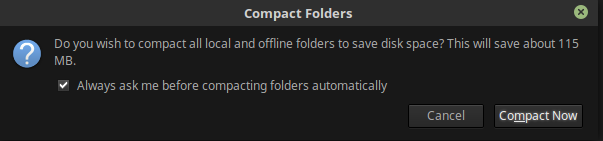
Hi all! When I start up Thunderbird, I am always prompted to compact my folders. See attached screenshot. When I click the "Compact Now" button, I expect to see something like the other attached screenshot, but I see nothing at all. Sometimes it does run, but only saves up to 1 MB. My concern is that some of my mail may not be being compacted. Thus my mail might be vulnerable to corruption and loss.
For attempted fixes, all I have tried is selecting each account name and clicking File -> Compact Folders. It appears that it successfully compacts the folders of these accounts, but at most 1 or 2 MB are recovered. The prompt that 115 MB may be saved still appears when I close and open Thunderbird.
I am running Linux Mint 18.3 with Thunderbird 52.9.1 .

所有回复 (6)
选择的解决方案
Two things: 1. there is no progress bar or window, but in the bottom status bar it should which folders are being compacted 2. there is currently a bug which gives a false high disk savings amount - so the 110MB might be correct
Hi Wayne! Thanks for your answers. Am I right in thinking this is that bug?
You might also want to place Thunderbird into offline mode and manually compact as the release version is not compacting IMAP accounts while "online" at least that is what I read in the release notes to TB60.
Matt said
You might also want to place Thunderbird into offline mode and manually compact as the release version is not compacting IMAP accounts while "online" at least that is what I read in the release notes to TB60.
Manual works regardless of offline or online status. Only automatic is affected. (the release notes are simplified)
由Wayne Mery于修改
Sorry for the noise then.