


Firefox crashes

Over the past 4 days Firefox 57.0.4 has crashed nine times. Error codes include [@ DispatchToTracer<T> ] 2 times [@ mozilla::CycleCollectedJSRuntime::RemoveJSHolder ] [@ TraversalTracer::onChild ] [@ js::TraceNullableEdge<T> ] 5 times [@ mozilla::dom::CallbackObject::cycleCollection::Trace ]
The crashes occur when I am not even at the computer, so there is nothing explicit that I am doing. I do keep the borwser open constantly, with many tabs open.
所有回复 (5)

You are saying the crashes happen when you leave the browser open and walk away?
In the address bar, type about:crashes<enter>. Note: If any reports do not have BP- in front of the numbers/letters, click it to submit them.
The crash report is several pages of data. We need the report numbers to see the whole report.
Using your mouse, mark the most recent 7 - 10 crash reports, and copy them. Now go to the reply box and paste them in.
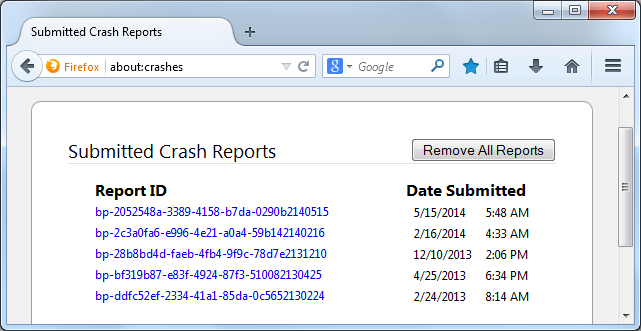
For more help on crash reports, see; https://support.mozilla.org/en-US/kb/firefox-crashes-asking-support
Fred,
Here are the crashes for 2018: bp-7d9b0489-83f3-4db6-aabb-e82db1180120 1/20/2018 9:42 AM bp-0b175004-cf23-49c2-b8d2-629571180119 1/19/2018 9:56 AM bp-f3748150-fb80-48af-8d7c-c015a1180118 1/18/2018 5:28 PM bp-1507cbf7-11a0-4938-a35e-5ca1d1180118 1/18/2018 10:35 AM bp-8268474c-c2d9-4825-b8be-a3c771180117 1/17/2018 6:19 PM bp-484e56c8-7f31-4d71-98fd-566721180117 1/17/2018 10:16 AM bp-b1c99629-a48e-482a-a44d-4d6371180117 1/17/2018 7:01 AM bp-fb2c4752-0618-4746-b2e4-3e4bb1180116 1/16/2018 1:59 PM bp-5a7d838c-2b96-4fbd-9797-ba6941180116 1/16/2018 8:47 AM bp-1b822b21-a5aa-4517-a122-bd1710180115 1/15/2018 8:39 AM bp-6353c7c2-245e-4359-a2a3-82a941180105 1/5/2018 7:32 AM
bp-7d9b0489-83f3-4db6-aabb-e82db1180120 Signature: nsPurpleBuffer::VisitEntries<T>
nvwgf2umx.dll = Dwm.exe = Microsoft Desktop Window Manager
This is for Sumo's Related Bugs 1318810 NEW --- Crash in nsPurpleBuffer::VisitEntries<T> +++++++++++++++++++++++++++++++++++++++++++++++ bp-0b175004-cf23-49c2-b8d2-629571180119 Signature: DispatchToTracer<T>
This is for Sumo's Related Bugs 1259699 RESOLVED FIXED spike in JS-related EXCEPTION_STACK_OVERFLOW crashes on nightly 1191503 REOPENED --- Crash [@ DispatchToTracer<T>(JSTracer*, JSString**, char const*)] ++++++++++++++++++++++++++++++++++++++++++++++ bp-f3748150-fb80-48af-8d7c-c015a1180118 Signature: mozilla::CycleCollectedJSRuntime::RemoveJSHolder
This is for Sumo's Related Bugs 1391457 RESOLVED INCOMPLETE Intermittent browser/extensions/formautofill/test/unit/test_activeStatus.js | application crashed [@ mozilla::CycleCollectedJSRuntime::RemoveJSHolder] +++++++++++++++++++++++++++++++++++++++++++++ bp-1507cbf7-11a0-4938-a35e-5ca1d1180118 Signature: TraversalTracer::onChild
This is for Sumo's Related Bugs 1357414 RESOLVED DUPLICATE Crash in TraversalTracer::onChild 1310926 NEW --- Crash in TraversalTracer::onChild
Let’s do a full clean re-install;
Download Firefox For All languages And Systems {web link}
Save the file. Then Close Firefox.
Using your file browser, open the Programs Folder on your computer.
Windows: C:\Program Files C:\Program Files (x86)
Mac: Open the "Applications" folder. https://support.mozilla.org/en-US/kb/how-download-and-install-firefox-mac
Linux: Check your user manual. If you installed Firefox with the distro-based package manager, you should use the same way to uninstall it. See Install Firefox on Linux; https://support.mozilla.org/en-US/kb/install-firefox-linux
If you downloaded and installed the binary package from the Firefox download page, simply remove the folder Firefox in your home directory. http://www.mozilla.org/firefox#desktop ++++++++++++++++++++++++++++ Look for, and remove any Mozilla or Firefox program folders. Do not remove the Mozilla Thunderbird folder if there is one.
Do Not remove the profiles folder.
After rebooting the computer, run a registry scanner if you have one. Then run the installer. +++++++++++++++++++++++++++ If there is a problem, start your Computer in safe mode and try again.
http://encyclopedia2.thefreedictionary.com/Linux+Safe+Mode This shows how to Start all Computers in Safe Mode; Free Online Encyclopedia
When I shut Firefox down, it crashed with this error: [@ AsyncShutdownTimeout | profile-before-change | Native Messaging: Wait for application PrivacyGuardianNativeMessaging to exit,Native Messaging: Wait for application PrivacyGuardianNativeMessaging to exit,Native Messaging: Wait for application PrivacyGua... ]. The UUID is 6f8dd0b5-318b-4db4-b7b0-05a181180120. Then my PC would not reboot until I ran through some disk repair steps! Finally it seems to be back up and running, and I've reinstalled Firefox 57.0.4. Let's keep our fingers crossed that no more crashes happen!