


How can I prevent Firefox from applying the default font setting to my web app?

I have a web app that uses the font Roboto. When running the app and opening its localhost address on Firefox, the app is rendered in Times New Roman (my Firefox default font). Changing the default font also changes how the app is rendered. How do I prevent Firefox from applying the default font? I want to see my web app as it is, in Roboto.
Opening the web app in other browsers does not have any issues.
所有回复 (5)
nexus_asyap said
I have a web app that uses the font Roboto. When running the app and opening its localhost address on Firefox, the app is rendered in Times New Roman (my Firefox default font).
Hmm, what do you mean by "opening its localhost address"? Firefox may apply cross-site restrictions to web fonts. Could you check the Browser Console for any relevant security-related messages?
jscher2000 said
nexus_asyap saidI have a web app that uses the font Roboto. When running the app and opening its localhost address on Firefox, the app is rendered in Times New Roman (my Firefox default font).Hmm, what do you mean by "opening its localhost address"? Firefox may apply cross-site restrictions to web fonts. Could you check the Browser Console for any relevant security-related messages?
The app is just something I run locally using bokeh, a Python library. I start the service and enter localhost:<portnumber> on Firefox to open it.
Attached is a screenshot of my browser console after loading the page.

Do you see the Roboto as one of the fonts being used?
Is this font installed locally?
What CSS code do you use to apply this font?
cor-el said
Do you see the Roboto as one of the fonts being used? Is this font installed locally? What CSS code do you use to apply this font?
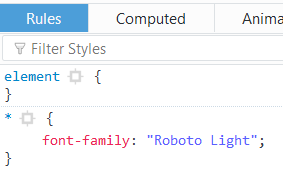
Yes. Roboto Light is the only font under font-family. It is also installed locally and is usable in other programs. Opening the app in Internet Explorer renders correctly as well.
Here is the CSS code. It also includes "Roboto Light" under font-family.
- {
font-family : "Roboto Light";
}
/*--------------OVERRIDE BOKEH DEFAULT ATTRIBUTES--------------*/
.input{
   font-size           : 20pt !important;
   padding-top         : 5px !important;
   padding-bottom      : 5px !important;
   height              : 50px !important;
}
/*-------------------------CLASSES------------------------------*/
.emphasis{
   font-size           : 30pt;
   text-align          : center;
   display             : block;
}
.object{
   font-size           : 20pt;
   text-align          : right;
   padding-top         : 30px;
   display             : block;
}
.labels{
   font-size           : 20pt;
   text-align          : left;
}
On Windows Firefox may not distinguish between the various fonts that belong to specific font-family and treat them as one font family. A specific variant is chosen based upon what font style and variant and weight rules are specified via the CSS properties.
You may have to add a font-weight:300; rule.