


Windows 10 已于2025年10月14日停止支持。如果您正在使用 Windows 10,参见 这篇文章

Windows 10 reached EOS (end of support) on October 14, 2025. If you are on Windows 10, see this article.

搜索 | 用户支持

防范以用户支持为名的诈骗。我们绝对不会要求您拨打电话或发送短信,及提供任何个人信息。请使用“举报滥用”选项报告涉及违规的行为。

详细了解
已存档

Redirect notice when opening Google image search results in new tab

BadCash 已回复
BadCash

When I'm doing a Google image search and try to open one of the search results in a new tab, I always get a "Redirect notice" page where I have to click on a link to get to the target URL.

To clarify, here's exactly what I'm doing:


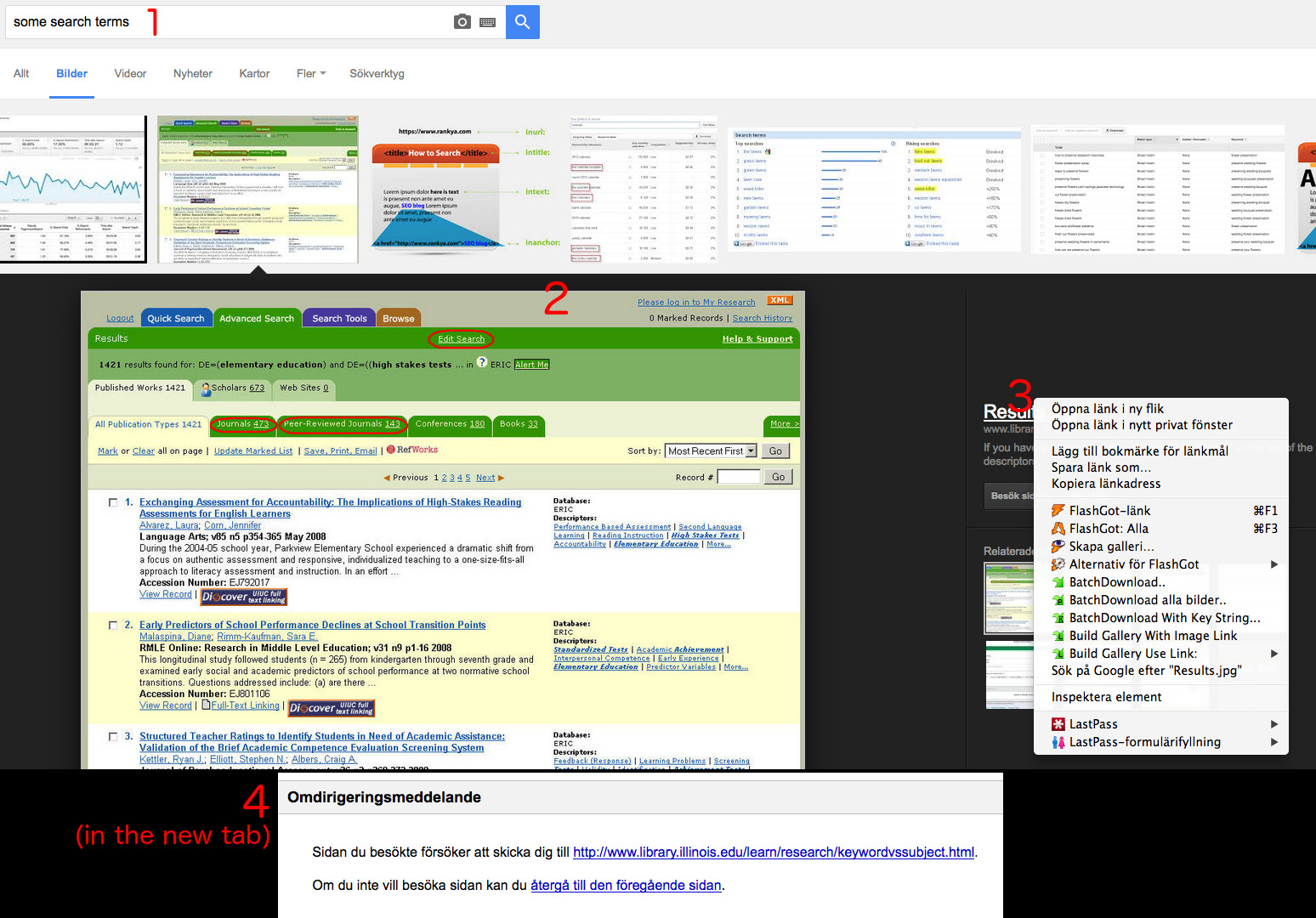
1. Do a Google image search for something, let's say "some search terms".

2. Click on a result image.

3. Right click on the image title and select "Open in new tab".

4. The new tab opens, but contains a page saying "Redirect notice" where I have to click a link to get to the actual URL I wanted to go to.


To add to the strangeness, if I try to open the URL in the same tab by just left clicking it, nothing at all happens (the URL doesn't open).


This only happens in Firefox, not in Chrome. Is there some setting I should turn on/off? I have turned off the Options->Advanced->General->Warn when websites try to redirect or reload the page setting. I'm on a Mac if it matters.
When I'm doing a Google image search and try to open one of the search results in a new tab, I always get a "Redirect notice" page where I have to click on a link to get to the target URL. To clarify, here's exactly what I'm doing: 1. Do a Google image search for something, let's say "some search terms". 2. Click on a result image. 3. Right click on the image title and select "Open in new tab". 4. The new tab opens, but contains a page saying "Redirect notice" where I have to click a link to get to the actual URL I wanted to go to. To add to the strangeness, if I try to open the URL in the same tab by just left clicking it, nothing at all happens (the URL doesn't open). This only happens in Firefox, not in Chrome. Is there some setting I should turn on/off? I have turned off the Options->Advanced->General->Warn when websites try to redirect or reload the page setting. I'm on a Mac if it matters.
已附加屏幕截图

由BadCash于修改

所有回复 (1)

Ok nevermind, I tried turning off my extensions one by one, it turns out that it was "Searchonymous" that was causing this issue.