


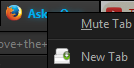
How do I remove the "Mute Tab" menu item?

Firefox 43 seems to have added a mute tab item to the right-click menu on tabs. This is where the new tab item used to sit, so I'm constantly hitting the damn mute tab button when trying to make a new tab. Is there any way of reverting this?
I don't mind the icon/button for tabs that play audio. That's actually quite useful.
I'm using Cyberfox, but I assume that it's a Firefox thing, because I can't find it in the Cyberfox options.
被采纳的解决方案
Mute Tab is a new item either in Firefox 42 or 43. Cyberfox probably inherited it. But I would look to Tab Mix Plus for a fix because (A) Firefox doesn't let you change context menus and (B) TMP is already modifying the list anyway.
There's a recent development version available for testing, but I don't know whether it addresses this issue:
https://addons.mozilla.org/firefox/addon/tab-mix-plus/versions/
定位到答案原位置 👍 3所有回复 (6)
Hmm, I don't have "New Tab" on the tab context menu, and my top item is "Reload Tab". Are you using an extension to customize your tabbed browsing experience? It might need an update to fix the placement of the menu items. Or perhaps one already is available...
jscher2000 said
Hmm, I don't have "New Tab" on the tab context menu, and my top item is "Reload Tab". Are you using an extension to customize your tabbed browsing experience? It might need an update to fix the placement of the menu items. Or perhaps one already is available...
Yeah, using TabMixPlus, but the mute item wasn't there previously, and I don't think there's been an update to the add-on since then. The mute item appeared when I updated Cyberfox from 42 to 43.0. I guess it could be something Cyberfox added, but they've got options in the advanced section for all the extra functions they add (to my knowledge), and this mute item isn't among them.
I also can't find anything relevant when searching for "mute" in about:config.
选择的解决方案
Mute Tab is a new item either in Firefox 42 or 43. Cyberfox probably inherited it. But I would look to Tab Mix Plus for a fix because (A) Firefox doesn't let you change context menus and (B) TMP is already modifying the list anyway.
There's a recent development version available for testing, but I don't know whether it addresses this issue:
https://addons.mozilla.org/firefox/addon/tab-mix-plus/versions/
jscher2000 said
Mute Tab is a new item either in Firefox 42 or 43. Cyberfox probably inherited it. But I would look to Tab Mix Plus for a fix because (A) Firefox doesn't let you change context menus and (B) TMP is already modifying the list anyway. There's a recent development version available for testing, but I don't know whether it addresses this issue: https://addons.mozilla.org/firefox/addon/tab-mix-plus/versions/
Eeeey, the dev version seems to have added the option. I already went through the TMP settings before, with no luck, but the option is there in the dev version.
Thanks a lot!
Btw, will automatic updates for TMP still occur? Or has the installation of a dev version somehow altered my add-on update behavior?
由Karl于修改
Add code to the userChrome.css file below the default @namespace line.
@namespace url("http://www.mozilla.org/keymaster/gatekeeper/there.is.only.xul"); /* only needed once */

#context_toggleMuteTab { display:none !important; }
The customization files userChrome.css (user interface) and userContent.css (websites) are located in the chrome folder in the Firefox profile folder.
Karl said
Btw, will automatic updates for TMP still occur? Or has the installation of a dev version somehow altered my add-on update behavior?
That I do not know. My guess is, if the new version number of the final release is higher, you would get updated.