


Wordpress Edit Page content not loading or showing.

Hi,
Thank you for having this support available.
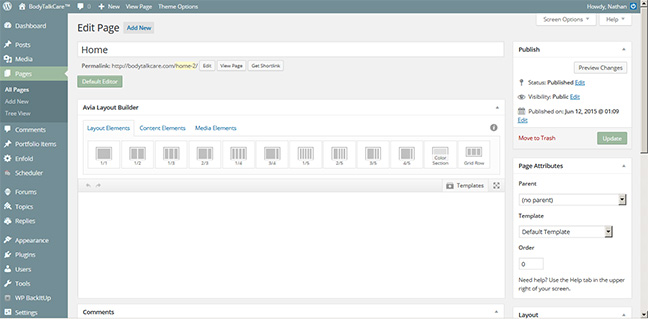
I have been using FireFox editing my WordPress website, and then last week it now if not loading the page content and no longer shows the content. I called my web server and hosting company and they were able to open it in their browser.
It is also now taking a long time to load and I have not uploaded any add-ons.
Nothing has changed on my computer.
Could you please help me create a solution?
Thank you.
所有回复 (3)
Many site issues can be caused by corrupt cookies or cache. In order to try to fix these problems, the first step is to clear both cookies and the cache. Note: This will temporarily log you out of all sites you're logged in to. To clear cache and cookies do the following:
- Click the menu button
 , choose History, and then "Clear Recent History...".
- Under "Time range to clear", select "Everything".
- Now, click the arrow next to Details to toggle the Details list active.
- From the details list, check Cache and Cookies and uncheck everything else.
- Now click the "Clear Now" button.
Further information can be found in the Delete browsing, search and download history on Firefox article.
Did this fix your problems? Please report back to us!
由the-edmeister于修改
Thank you for the suggestion.
It's still not showing any content in the page editor.
Is there a flash plugin that needs to be updated or installed?
Thank you for your assistance in resolving this.
Start Firefox in Safe Mode to check if one of the extensions (Firefox menu button/Tools > Add-ons > Extensions) or if hardware acceleration is causing the problem.
- Switch to the DEFAULT theme: Firefox menu button/Tools > Add-ons > Appearance
- Do NOT click the Reset button on the Safe Mode start window
- https://support.mozilla.org/kb/Safe+Mode
- https://support.mozilla.org/kb/Troubleshooting+extensions+and+themes
What security software do you have?
It is possible that your security software is blocking content. I think that Avast has been mentioned.
Boot the computer in Windows Safe Mode with network support (press F8 on the boot screen) to see if that helps.