


the firefox button is missing

The firefox button has gone missing from the top right of my browser. I have checked and unchecked the show menu and tried everything possible to find the button, but its gone. So, I cannot edit my homepage.
Any ideas what to do?
所有回复 (10)
Type about:customizing in the location bar, then revert to default settings about customizing the UI.

The orange Firefox button at the top of the browser was replaced.
In current Firefox releases (29 and later) the orange Firefox menu button has been replaced by the three-bar Firefox Menu button at the far right end of the Navigation Toolbar and this button is always visible whether the Menu Bar is visible or hidden. A consequence of this position is that you no longer can hide the Navigation Toolbar.
- There is a star like button next to the search bar on the Navigation Toolbar to bookmark the current web page and a "Show your bookmarks" button next to it to open the Bookmarks in a drop down menu.
You can find "Show All Bookmarks" to open the Bookmarks Manager (Library) at the bottom of this drop-down list - If you bookmark a page then "Bookmark This Page" in the Bookmarks menu changes to "Edit This Bookmark"
- You can make the title bar visible via the "Title Bar" button at the bottom left in the Customize palette window
It is still possible to have the Menu Bar visible via the right-click context menu of a toolbar to have menus like the File menu with Print (Ctrl+P) and Print Preview and the Bookmarks menu available.
See also:
the other problem is that there no longer is a star like button up there that gets me into the page to edit the bookmarks. Its gone. I do have the three bar icon, which is what I should have referenced, not the firefox logo, but it only takes me to customize, which has nothing that gets me to the pages that load automatically on starting firefox. I can get a list of bookmarks in the homepage to appear in a yellow pop up box at the lower right corner of the screen but it wont let you get in to edit them, there.
I am at a loss what to do
Do you know, if i revert to default will I lose my add ons and cusomizations, also?
If you do not have the combined star to bookmark the current tab and drop marker button (Show your bookmarks) next to it on the Navigation Toolbar then click the "Restore Defaults" button in the Customize palette.
ok, tried that and got the star back but it only lets me edit bookmarks. What I am trying to do is change the websites that open in the homepage there are five. I can see them in a pop up window when I hover the cursor over the homepage icon but cannot edit them.
You can check the home page setting:
- Tools > Options > General > Startup: Home page
Firefox supports multiple home pages separated by '|' (pipe) symbols.
there is no start up homepage tab in general (see screenshot)
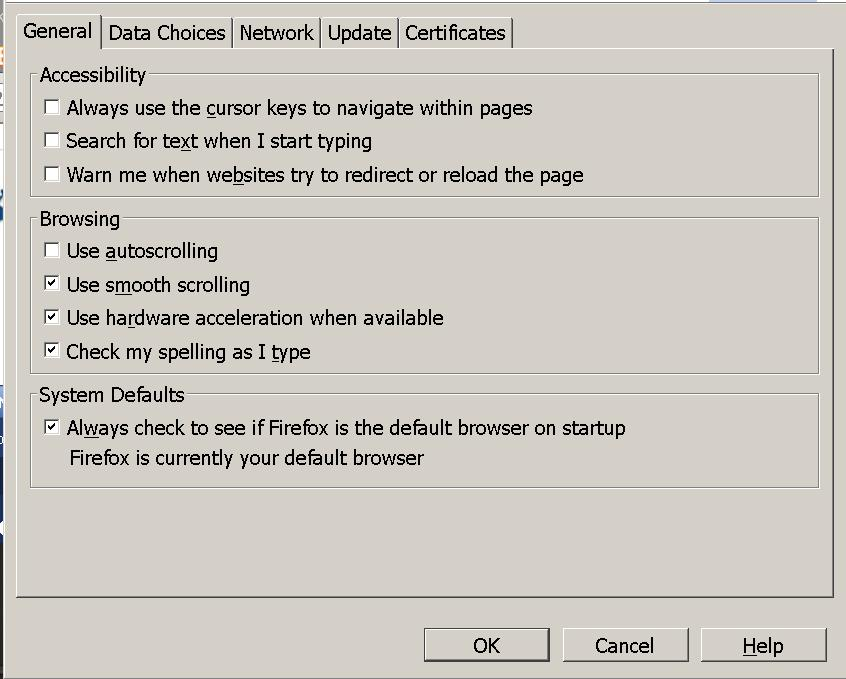
That is the Advanced option menu.
Type about:preferences<Enter> in the address bar From the menu on the right, select General.