How can I get folders for bookmarks back in sync with available folders when saving new?

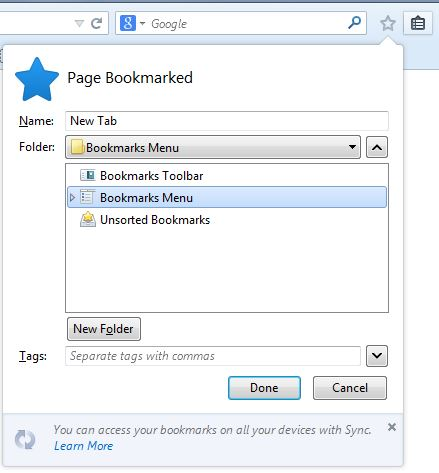
Select Bookmarks menu icon to the right of the star displays all of my folders. Ctrl+D shows window to save current page, but the folder list does not match the previously mention list of folders. See screenshot. The short list is a random mix of ones I have created. If I save it in the Unsorted Bookmarks folder, then I can open the Bookmarks menu and move the bookmark to a folder in the full list. Reset Firefox did not work. Export Bookmarks to HTML and Import them did not work. It did duplicate all of them, but I have deleted the duplicates. I would like to be able to use Ctrl+D to add a Bookmark and save it in one of the folders already created.
被采纳的解决方案
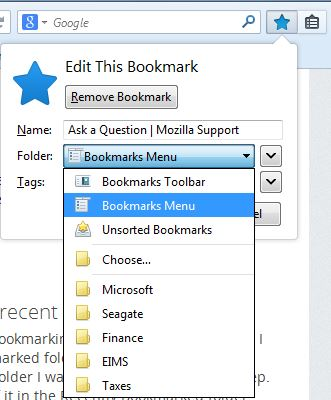
You only see a few recently used folders in the list to edit the bookmark.
You can click the "Choose..." item to open the full list on click the other down arrow at the far right outside on the drop-down list to see the full folder list.
定位到答案原位置 👍 1所有回复 (3)
Followup - I only have one profile: C:\Users\jwh\AppData\Local\Mozilla\Firefox\Profiles\rt9crg1n.default-1404871036389\
Screenshot of Ctrl+D folder list added
选择的解决方案
You only see a few recently used folders in the list to edit the bookmark.
You can click the "Choose..." item to open the full list on click the other down arrow at the far right outside on the drop-down list to see the full folder list.
Sure enough. See my second screenshot. An update must have collapsed the Bookmarks Menu. Now that I have used it once to save to a pre-existing folder, all of the folders in the Bookmarks Menu are displayed by default for subsequent saves. Thank you.