


instead of a "not now" option on the "remember password" question, how about a "not ever for this website" that is also reversible later?

it's maddening. there are certain web sites, in this day of heightened security concerns, for which i will not ask firefox to save my passwords. it is theoretically possible i could change my mind later in life (kind of like a vasectomy) but highly unlikely (see previous analogy). but it would be far, far better now to have at least an option in addition to the "not now" answer to be able to say, "not ever, not for this web site." and then every time after that i would expect to have to enter my login info and password.
tnx.
p.s. it looks to me like this recent change was cosmetic as much as anything. same problem i had with IE and microsoft. things are changed for change's sake. there's no reason to do these changes. IF they are functional and important for that reason, then make them but keep them within the same visual context.
所有回复 (2)
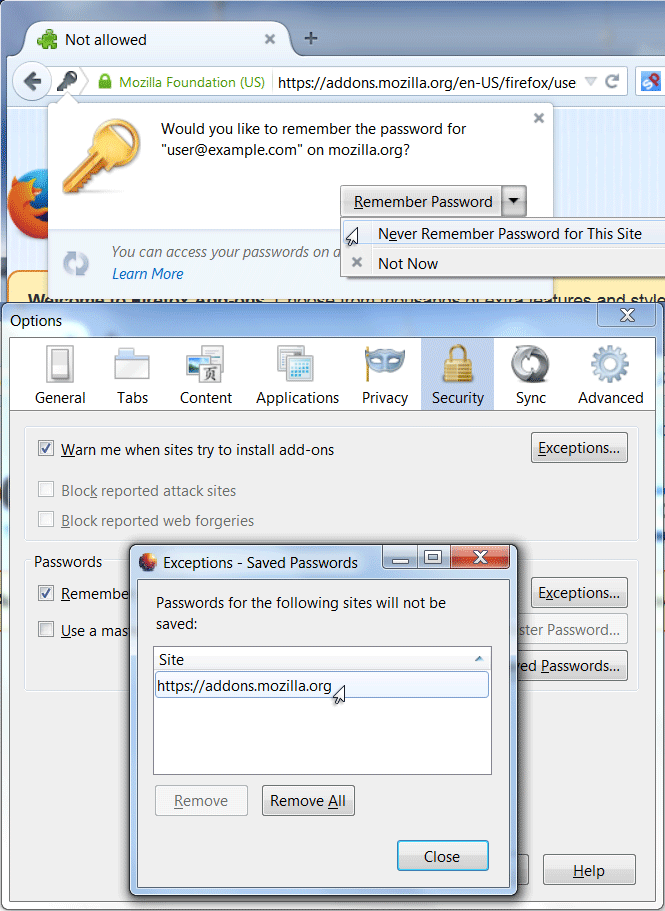
Click the ▼ dropdown arrow next to Remember Password and choose "Never Remember Password for This Site".
If you later change your mind,
- Click the ≡ Menu Button and choose Options.
- Click the Security icon.
- Click the Exceptions button.
- Select the site in question and click the Remove button.
- To remove saved login information, click the Saved Passwords button instead of Exceptions.
Password manager - Remember, delete, change and import saved passwords in Firefox
In case you are using "Clear history when Firefox closes" or clear the history otherwise:
- do not clear the Site Preferences
- Tools > Options > Privacy > Firefox will: "Use custom settings for history": [X] "Clear history when Firefox closes" > Settings
- https://support.mozilla.org/kb/remove-browsing-search-and-download-history
Note that clearing "Site Preferences" clears all exceptions for cookies, images, pop-up windows, software installation, passwords, and other website specific data.
You can also consider to access these website in a Private Browsing mode window as that will prevent Firefox from storing (new) data including asking to store a name/password.
You can use an extension to get Private Browsing mode support per tab and you can right-click a tab to toggle PB mode for a tab.
由cor-el于修改